What is antidetect browser and how to scale your work with it:A look at Dolphin Anty
Learn how to use Dolphin Anty with Helodata proxies to create and manage separate browser profiles, configure proxies, maintain consistent digital fingerprints, and scale workflows for SEO, web scraping, marketing, and e-commerce monitoring.
Every year, websites improve their methods for identifying users, so masking only your IP address with a proxy is no longer enough. Proxies help bypass regional restrictions. But if your access is blocked by the website itself, a proxy may not be enough because websites identify you not only by your IP address, but also by your browser, operating system, and device parameters.
Antidetect browsers help hide and mask all these parameters. At the same time, an antidetect browser does not simply hide them, but replaces them with different values.
This is the main difference between antidetect browsers and anonymous browsers such as Tor, which simply hide your browser and device data. This is important because if you simply hide parameters such as fonts, browser version, operating system version, and so on, website anti-fraud systems may consider this suspicious.
Regular users usually do not hide these parameters, so using an anonymous browser or Incognito mode may raise suspicion. An antidetect browser, on the other hand, looks like a regular user to a website. The difference is that the data the website sees is not real: it is either generated artificially or based on data from other users.
An antidetect browser allows you to create multiple digital identities. A digital identity is a unique combination of an IP address, cache, and fingerprint parameters.
How does an antidetect browser work and how do you use it? Let’s take Dolphin Anty as an example
The workspace of any antidetect browser, including Dolphin Anty, is a list of browser profiles. Each profile works as a separate browser with its own set of parameters. As an example, let’s launch one of the profiles in Dolphin Anty.
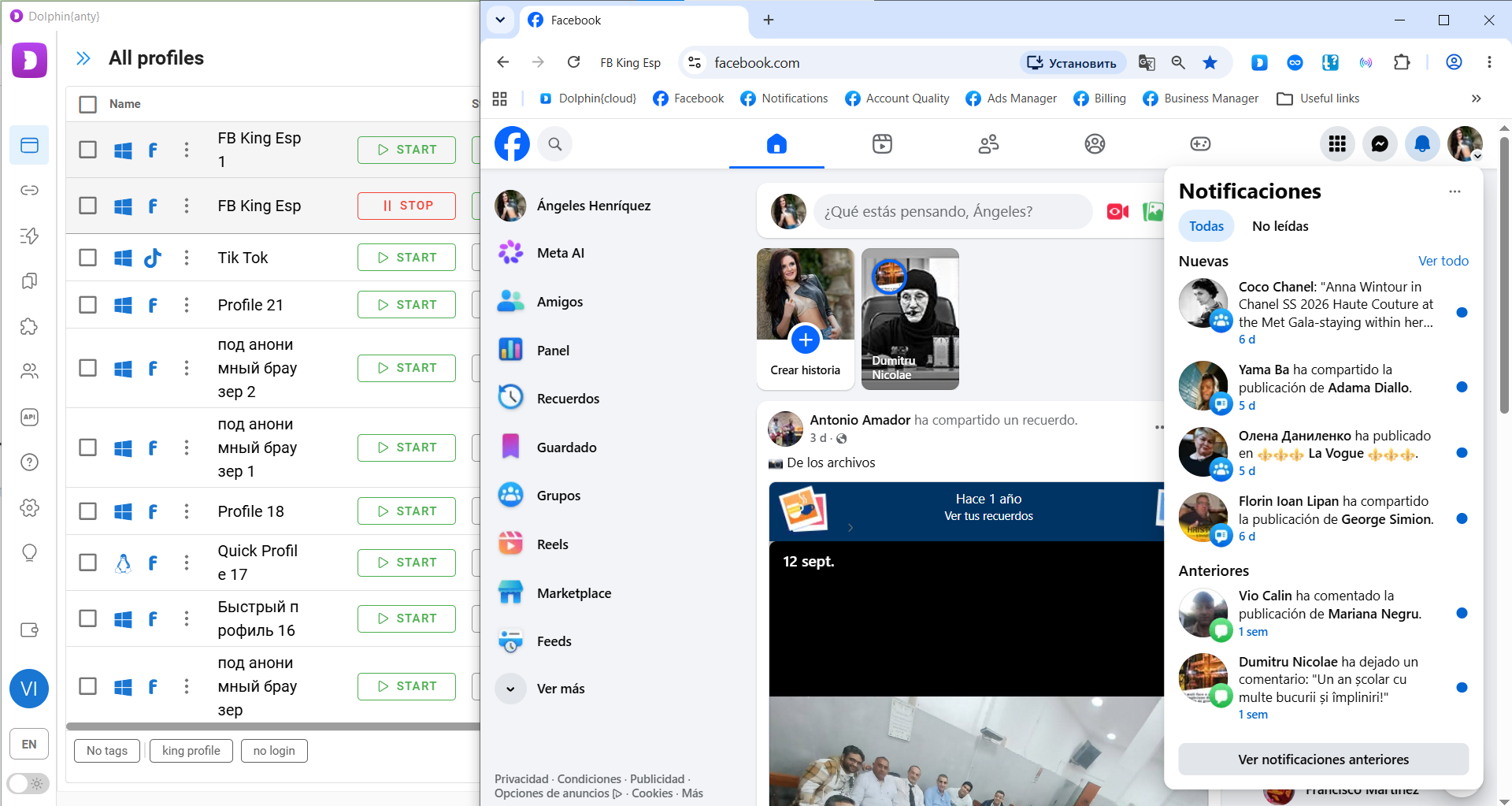
Each browser profile looks like a regular Google Chrome browser with its own separate environment.
To start working with a browser profile, you first need to create one. To do this, click Create Profile above the browser profile list. As a result, you get a new digital identity.
First, you add a proxy to the profile. This gives the profile a new IP address, just like a separate user. Second, you can add a set of cookies or collect them after creating the profile using the Cookie Robot feature (we’ll cover it below). Dolphin Anty automatically selects the remaining browser and device parameters.
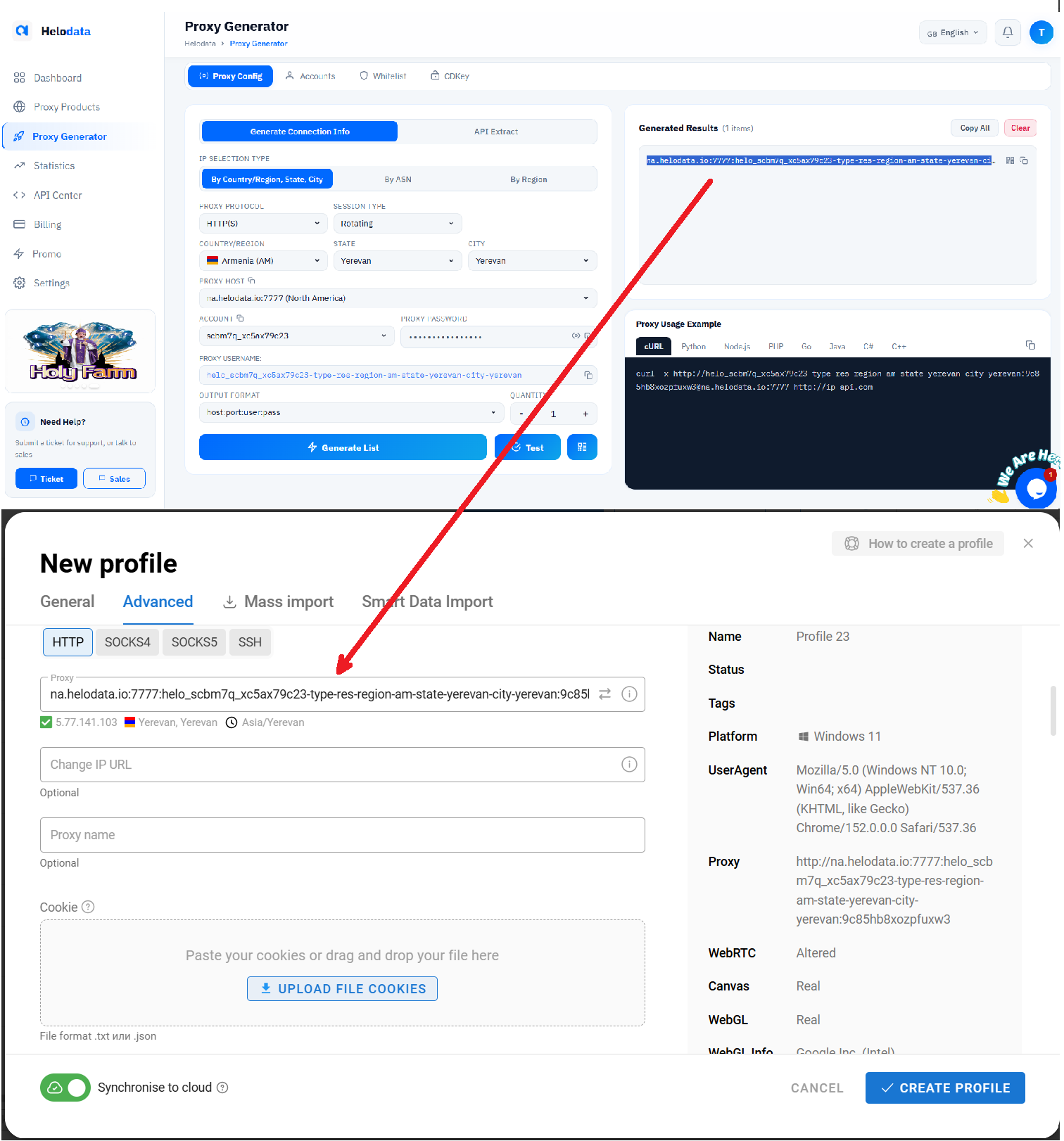
As a result, we now have a browser that successfully simulates an average user from Yerevan, Armenia. In the profile list, it appears as Profile 23.
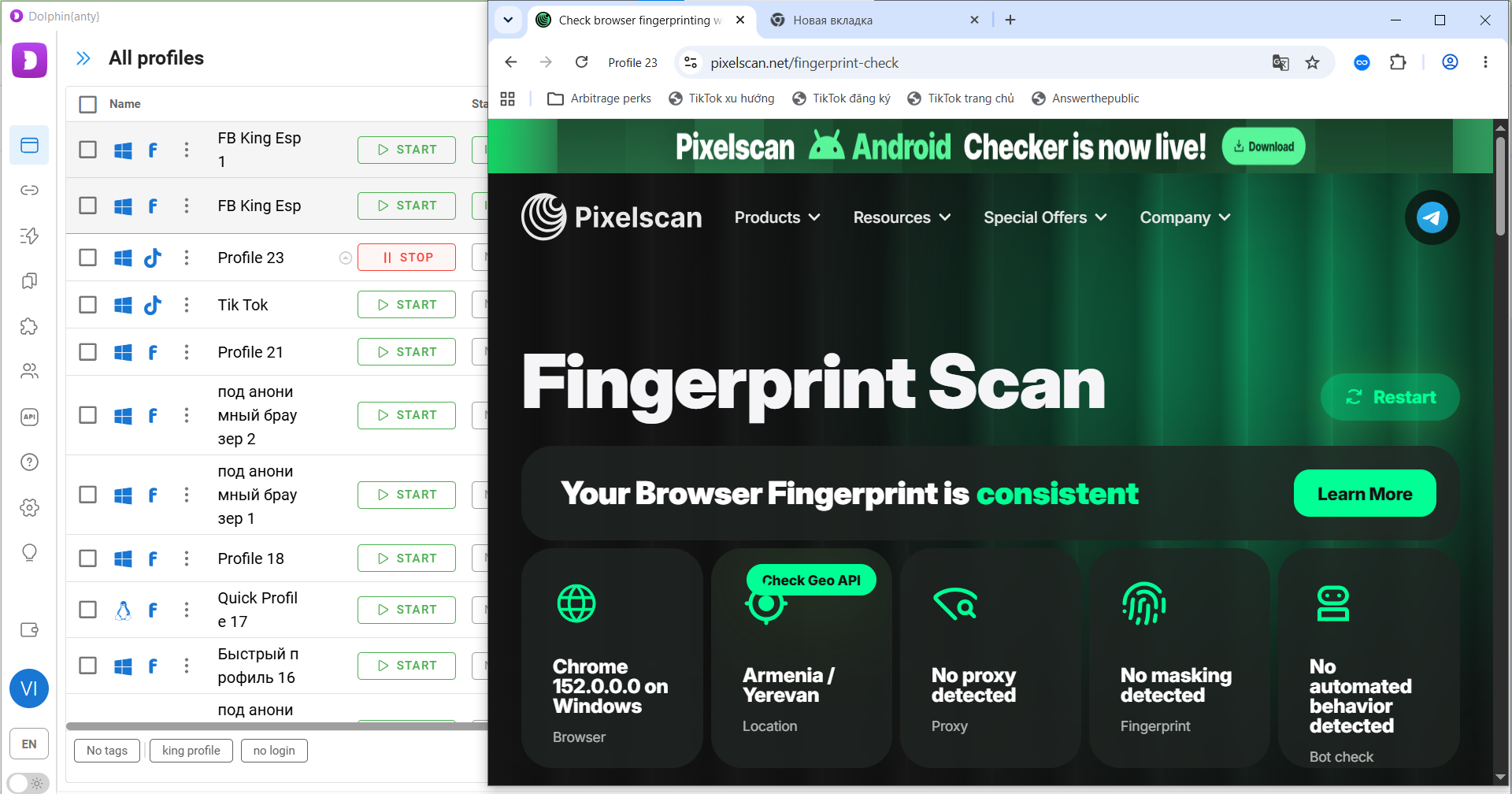
Important: an antidetect browser allows you to show websites a different operating system or a different version of your operating system, but experts strongly recommend against doing this. When creating a profile, it is better to keep your actual operating system because advanced anti-fraud systems can detect inconsistencies through indirect indicators, such as fonts.
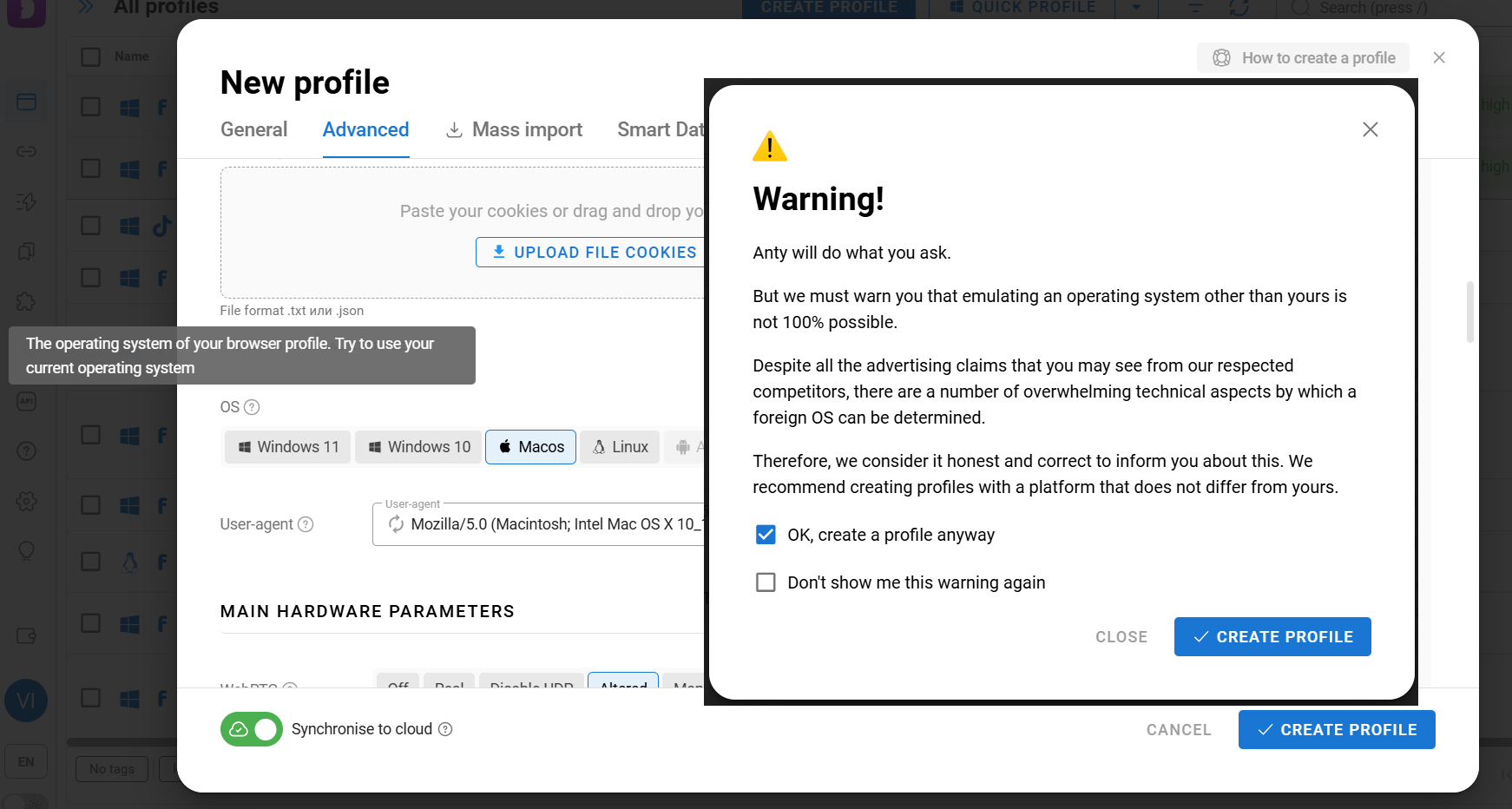
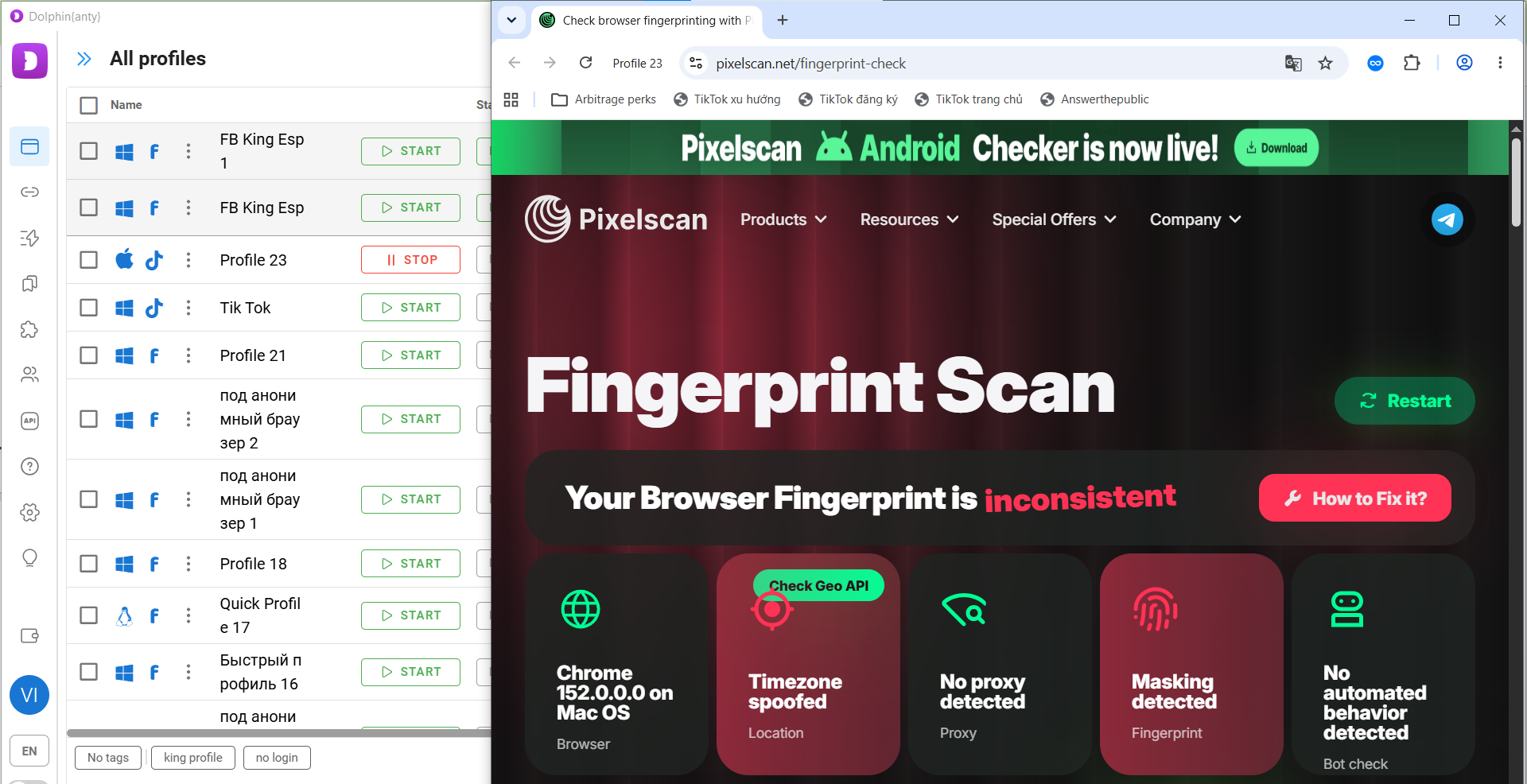
As an example, we created a browser profile with a different operating system. As you can see, first, a warning appeared recommending that you use your actual operating system when creating a profile. Second, when we checked this browser profile with Pixelscan, it immediately detected an inconsistency. In other words, it found signs of fingerprint masking, and the timezone spoofing did not work either. Facebook, TikTok, Google, and many other major platforms may detect the same inconsistencies.
Dolphin Anty uses fingerprints of real users as a basis
Here is an important point: when creating a browser profile, if you are not familiar with the basics of browser fingerprinting, do not change parameters such as User-Agent, GPU, WebGL, and others.
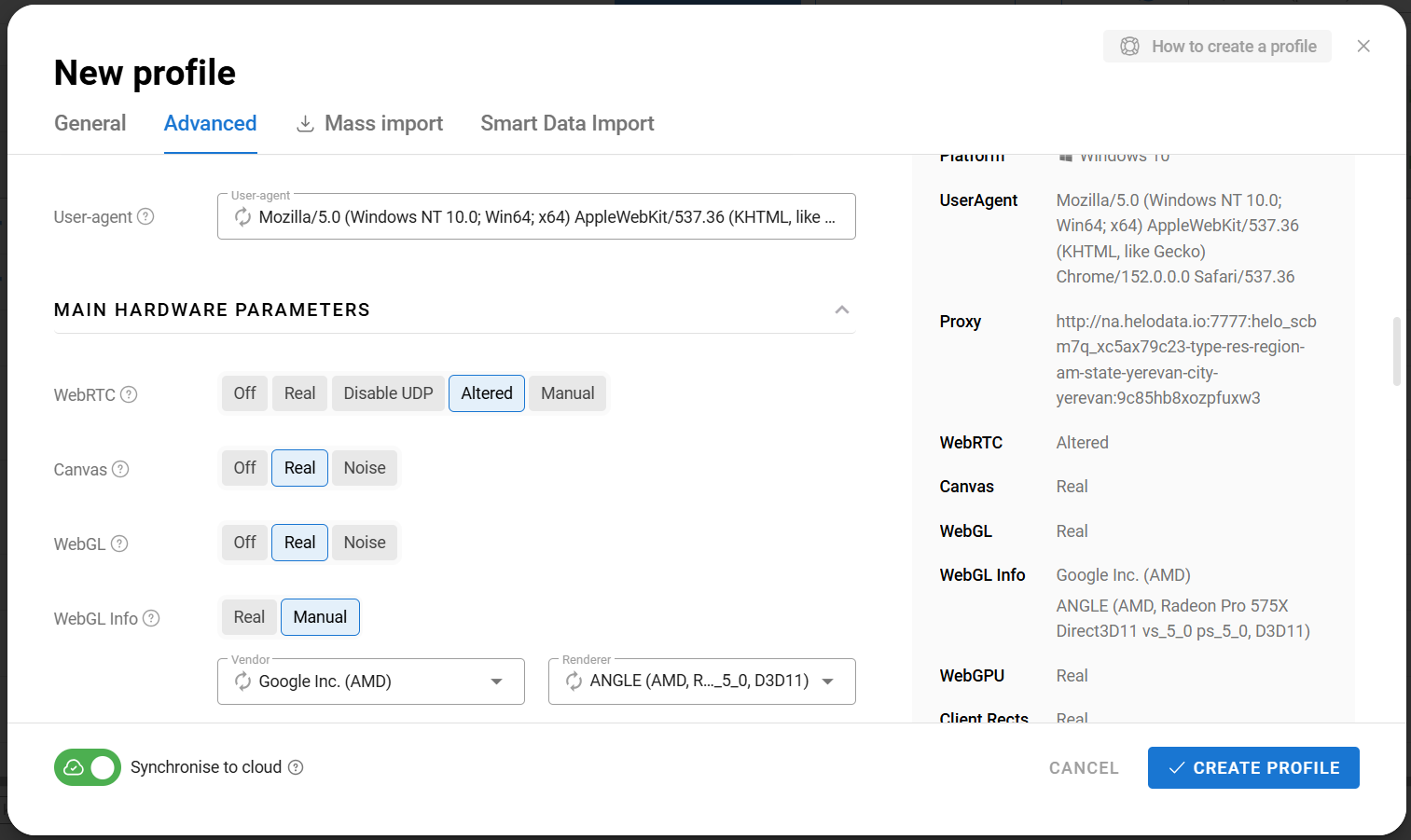
Unlike many antidetect browsers, Dolphin Anty does not build a browser fingerprint by combining random parameters. Instead, it uses real digital fingerprints from real users. When you add a proxy and select your operating system, Dolphin Anty automatically chooses a fingerprint that best matches your IP address and operating system. Therefore, changing fingerprint parameters without the necessary knowledge may only reduce the quality of the profile and make your digital fingerprint less consistent.
After creating a browser profile, check its fingerprint with Pixelscan. In the example above, we showed how the check results differ between correctly and incorrectly configured browser profiles. The “Your Fingerprint is Consistent” result indicates that Dolphin Anty and Helo Data proxies are working correctly and protecting your digital identity.
From theory to practice
Now you know how to create a browser profile in Dolphin Anty, add a proxy to it, and use Pixelscan to check whether everything is configured correctly. To put this knowledge into practice, try repeating the steps described above:
- Download Dolphin Anty from the official Dolphin Anty website and create an account;
- Create a proxy in Helo Proxy. If you are a new user, ask the support team via chat for 200 MB of free proxy traffic to create a port;
- Create a browser profile for free and add the proxy you created. Dolphin Anty offers a fully functional free plan for managing up to 5 browser profiles;
- Open Pixelscan in the newly created profile.
How to use Dolphin Anty with Helo Data Proxy
First, log in to your Helo Data Proxy account. Then create an account inside it that your proxies will be assigned to. Select Random Add to generate a name automatically or Manual Add to set the account name manually.
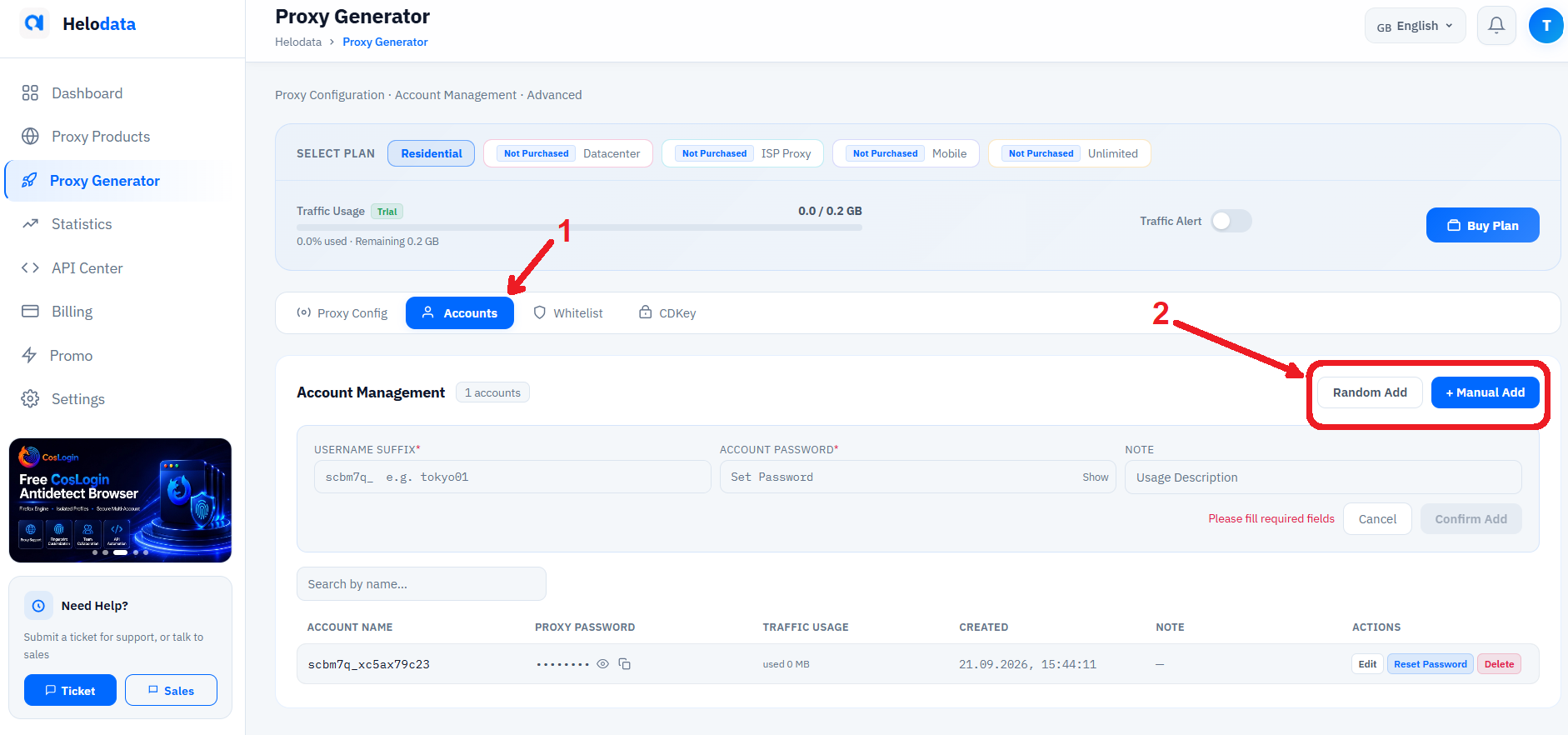
After creating a proxy account, create a proxy connection and assign it to that account. Select the country, city, ISP, and the account you want to assign the proxy to. If you have multiple accounts, select the one you need. If you have only one account, the proxies will be assigned to it automatically.
Then specify the number of proxy ports you want to create. Click Generate List, and you will get the specified number of proxy ports with the selected parameters.
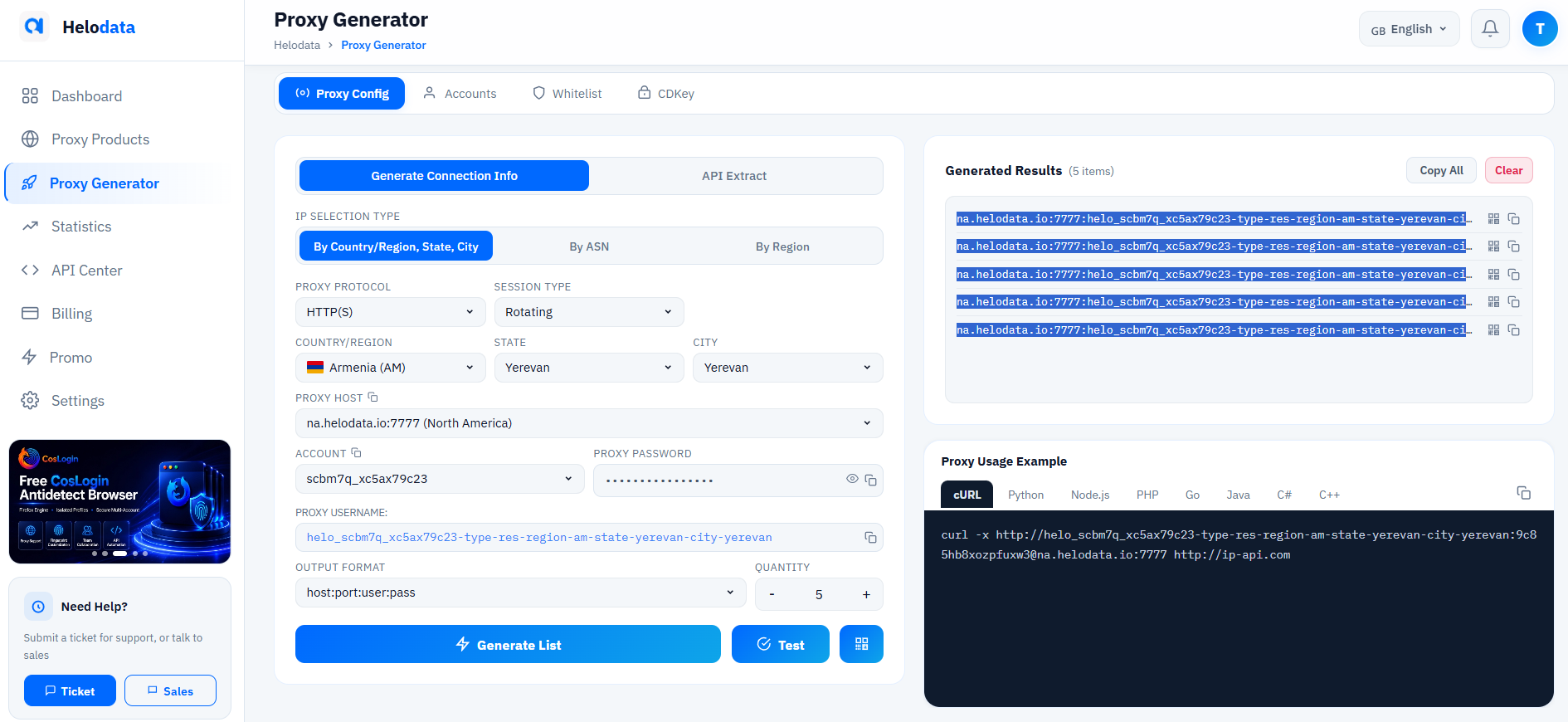
After that, copy the connection details and add them to the antidetect browser. You can copy proxy ports individually or copy them all at once for bulk addition. There are three ways to add proxies to the antidetect browser.
Method 1. Adding a proxy when creating a profile
The first method is to add a proxy directly when creating a browser profile. In the profile settings, go to the proxy section, select New Proxy, and paste the connection details.
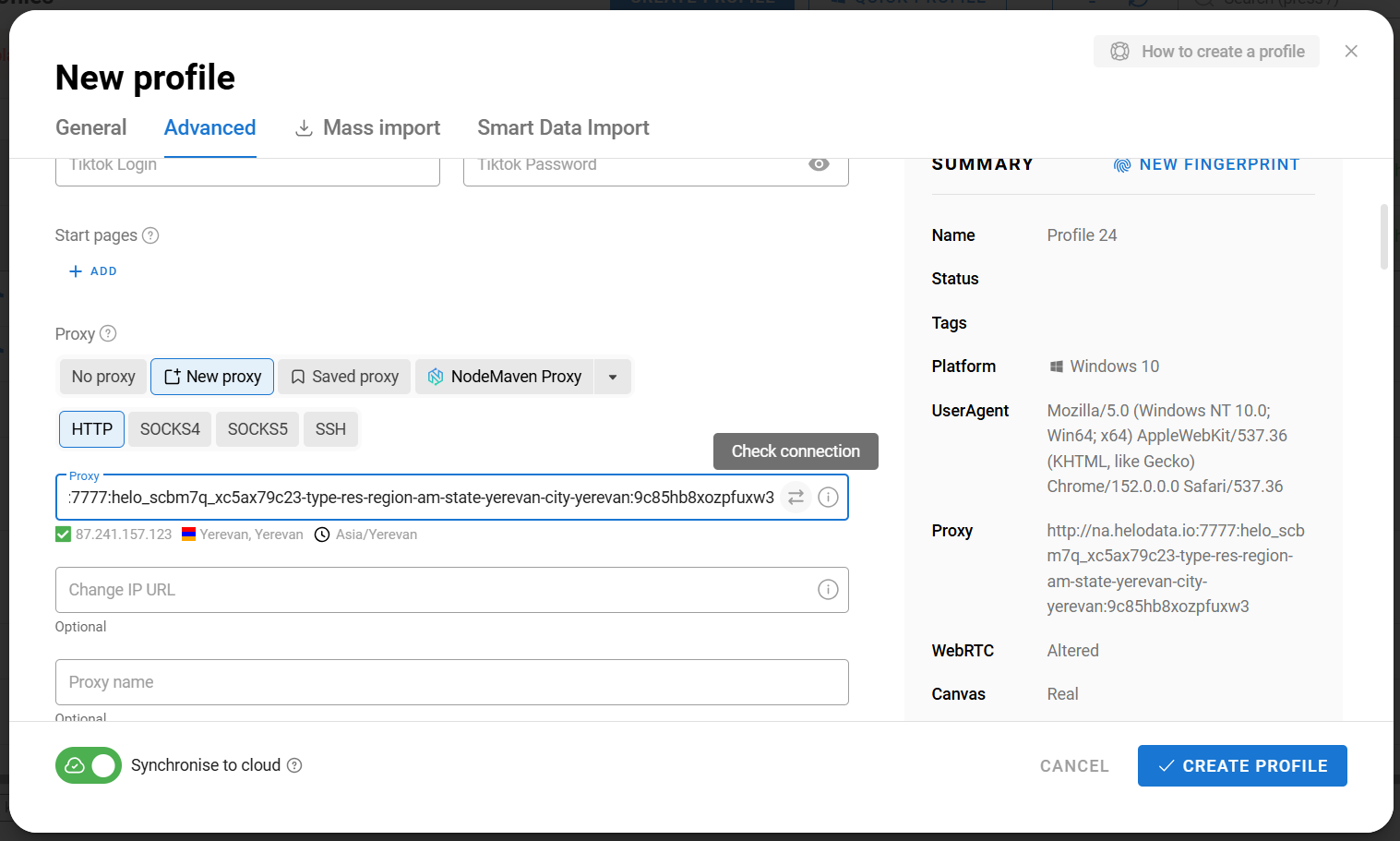
After entering the proxy details, click Check Connection to make sure the data is correct. If everything is configured properly, the city, country, and connection IP will appear below the field.
Method 2. Adding proxies in bulk
The second method is to add proxies in bulk. For this, you will need to copy several proxy ports at once.
First, create the browser profiles but do not launch them. Then select the profiles you need using the checkboxes and choose the option to change proxies from the bottom panel that appears.
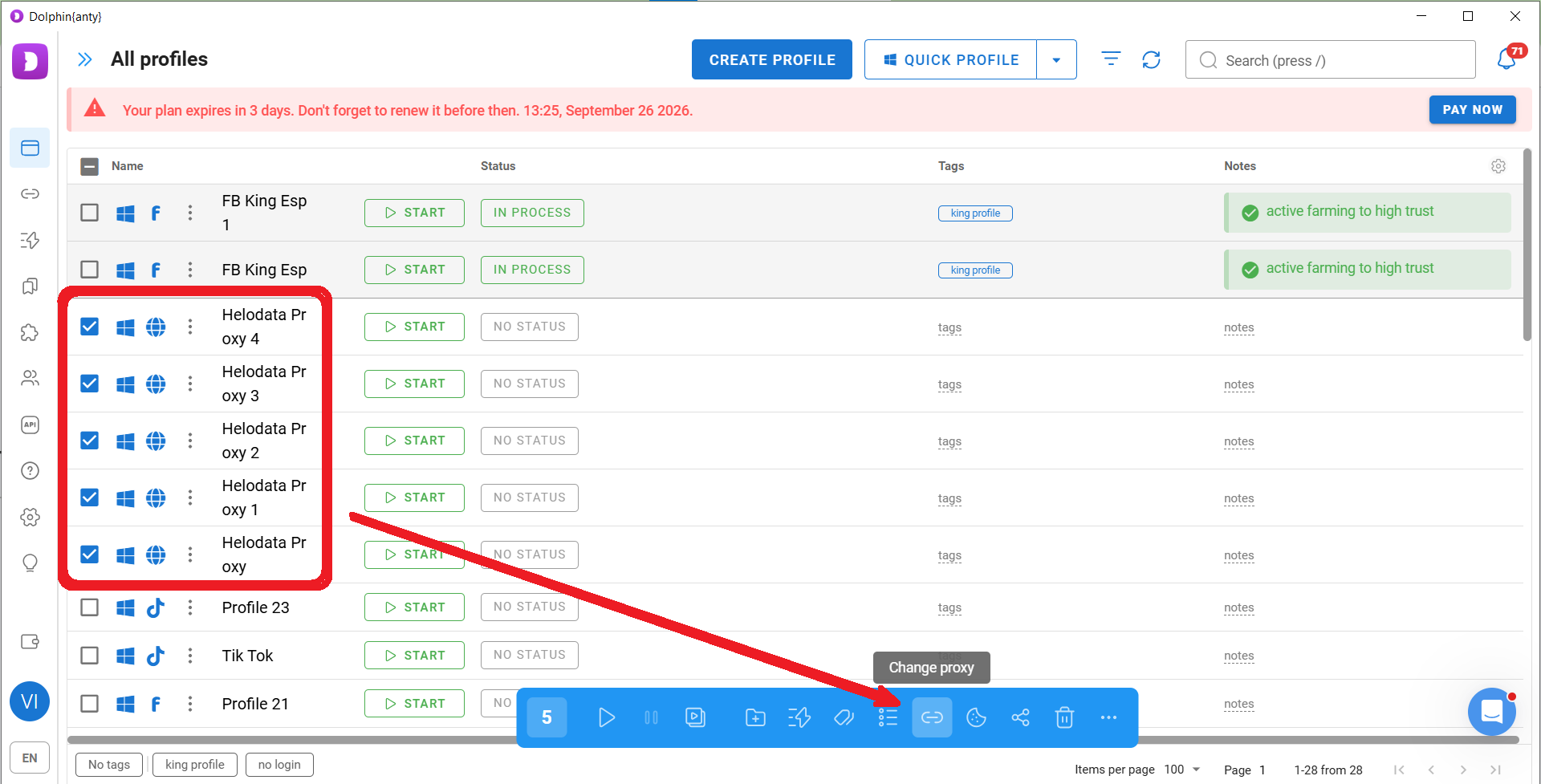
After that, select New Proxy → Mass Addition and paste all the copied proxies at once.
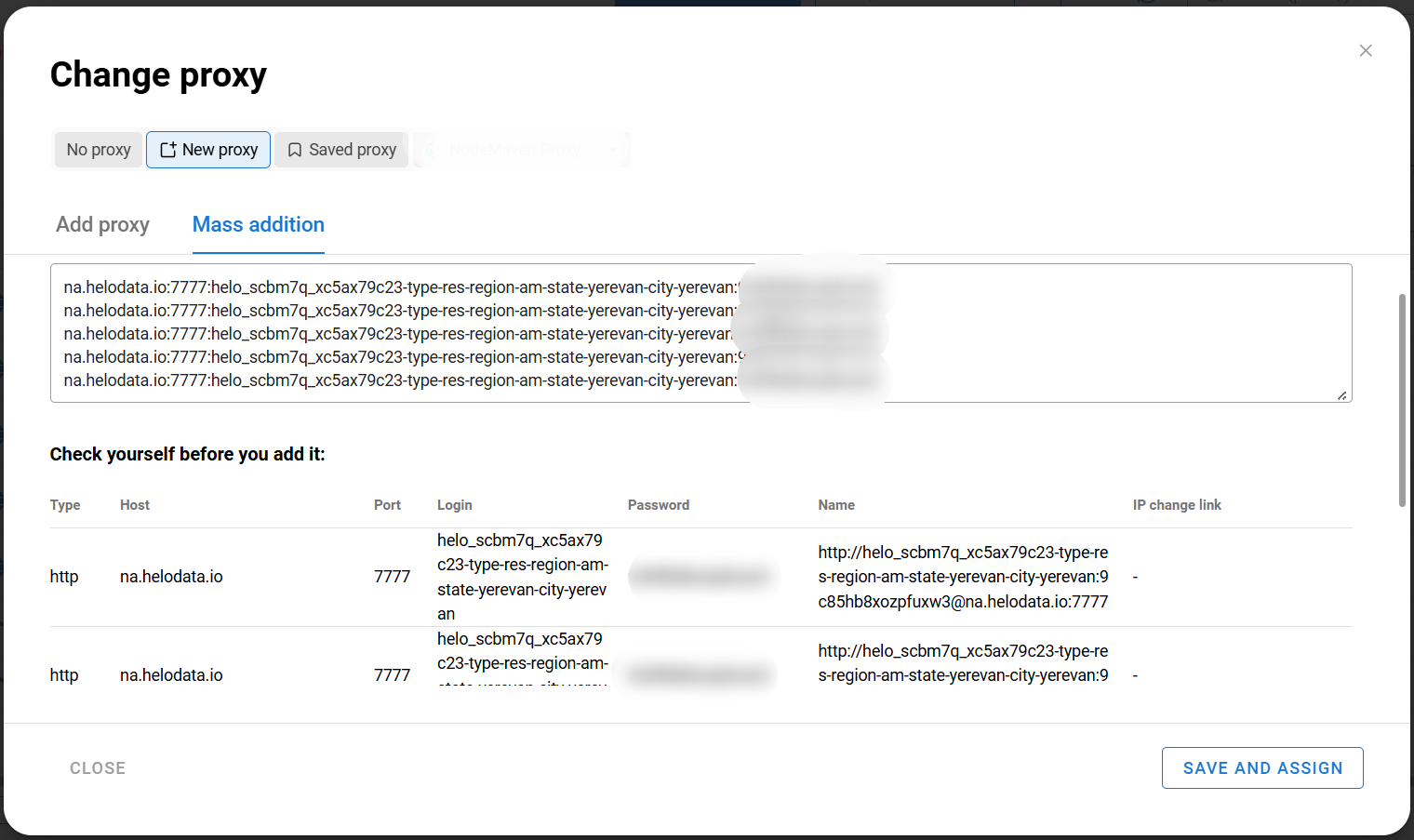
Dolphin Anty supports different proxy formats, so you do not need to format the data manually. Then click Save and Assign and select Sequentially to distribute the proxies among the profiles one by one.
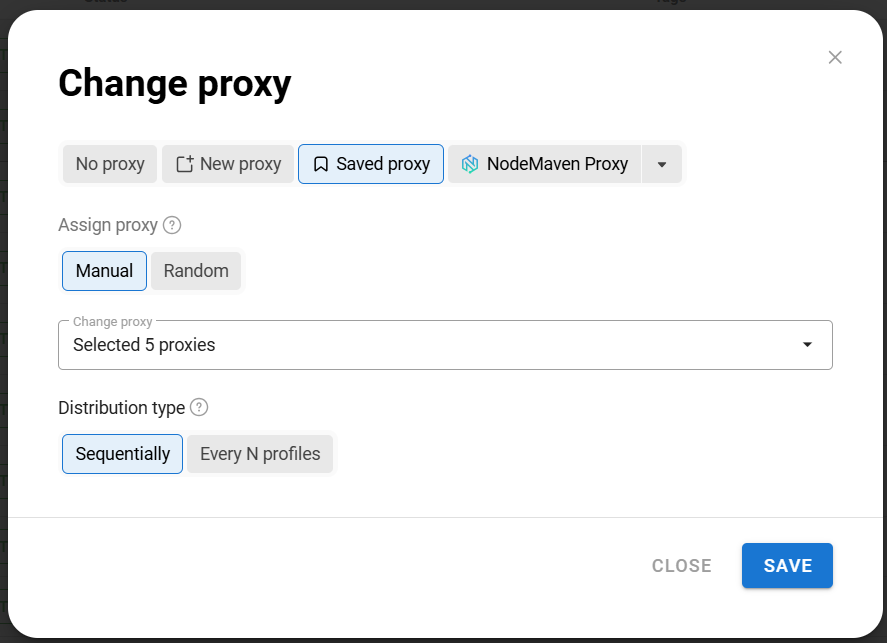
As a result, a separate proxy will be assigned to each selected browser profile.
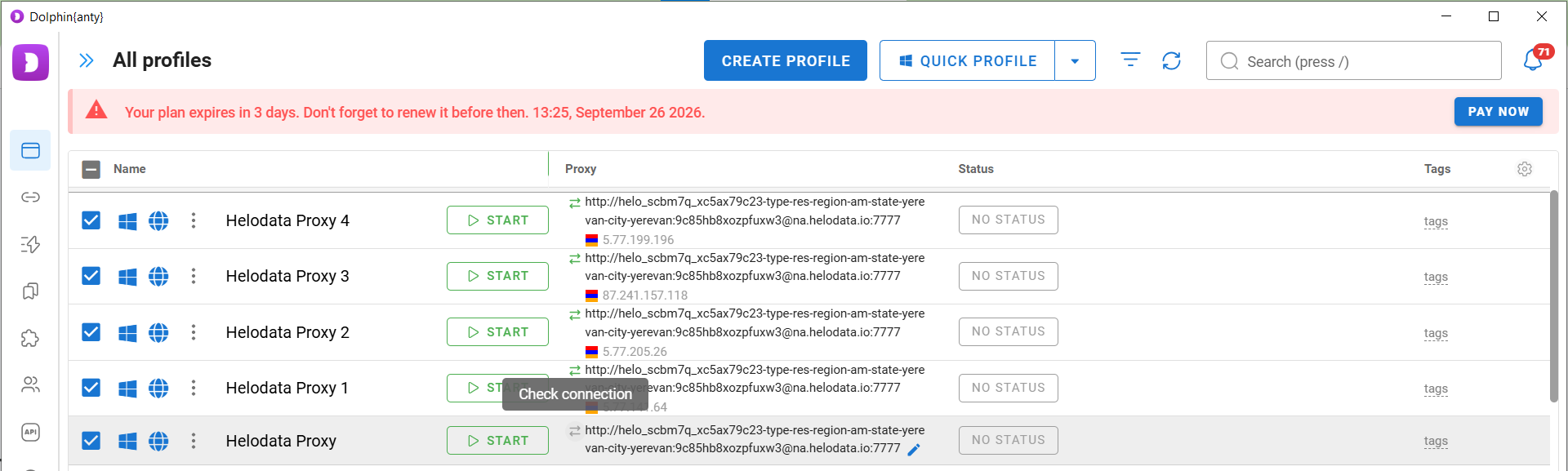
After adding the proxies, click Check Connection for each one to make sure they are working properly.
Method 3. Saving proxies in advance
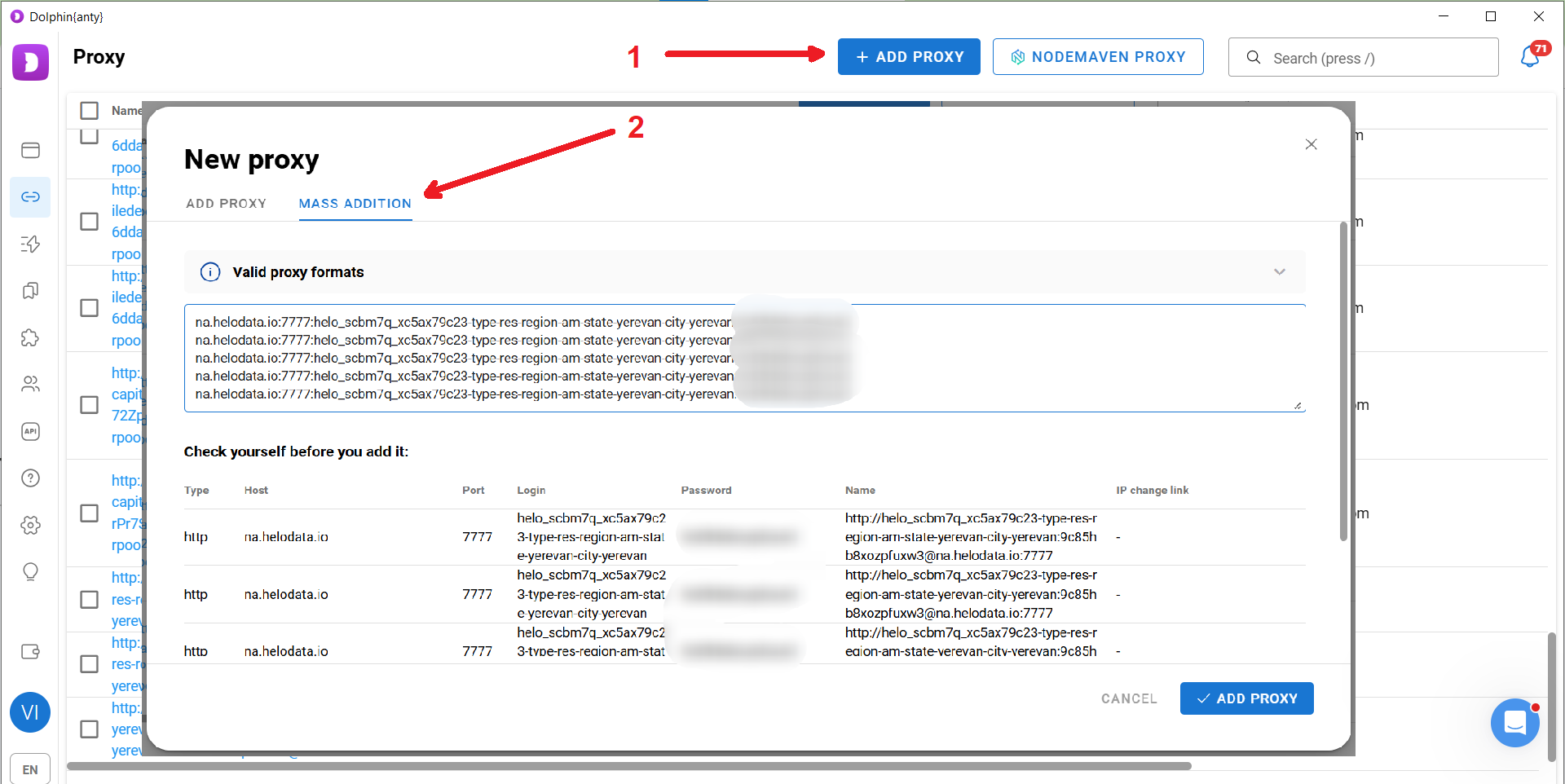
The third method is to save proxies in Dolphin Anty in advance. This is convenient if you plan to work with a large number of proxies. To do this, go to the Proxies section, click the button to add proxies, and select Mass Addition. Then paste the copied proxies into the field.
After adding the proxies, they will appear in the list. Select them using the checkboxes and click Check Proxy on the bottom panel. If everything is configured correctly, the proxies will receive Active status.
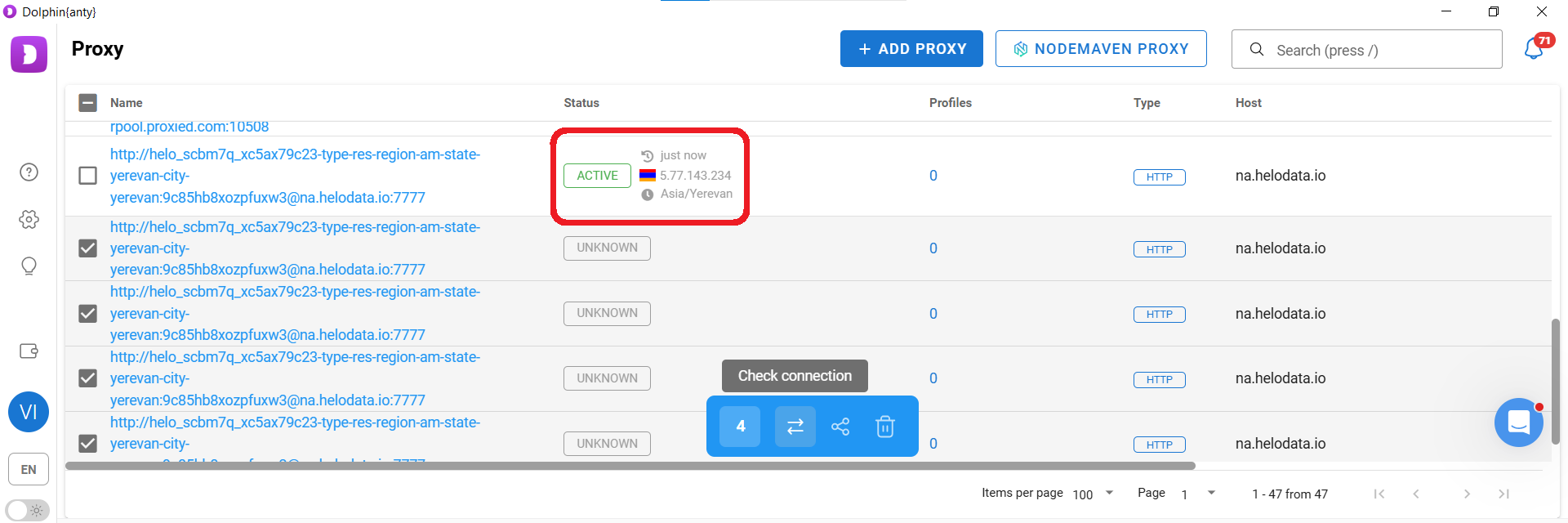
Saved proxies can now be selected when creating individual browser profiles or assigned in bulk to multiple existing profiles.
How to scale your work in Dolphin Anty
We now have a ready-to-use and easily scalable system for creating and managing multiple digital identities. You can create as many “new users” as you need and assign dozens of proxy ports to them in just a few clicks. Each one will have its own IP address, its own set of digital fingerprint parameters, and its own cookies.
However, bulk profile creation is not the only way to scale your work. Dolphin Anty also provides other useful tools, including profile copying, scenarios, and Synchronizer.
Copying profiles
To use this feature, create one browser profile, but do not add a proxy at this stage. Then hover over the three-dot menu next to the profile and select the copy option. Specify the number of copies you need.
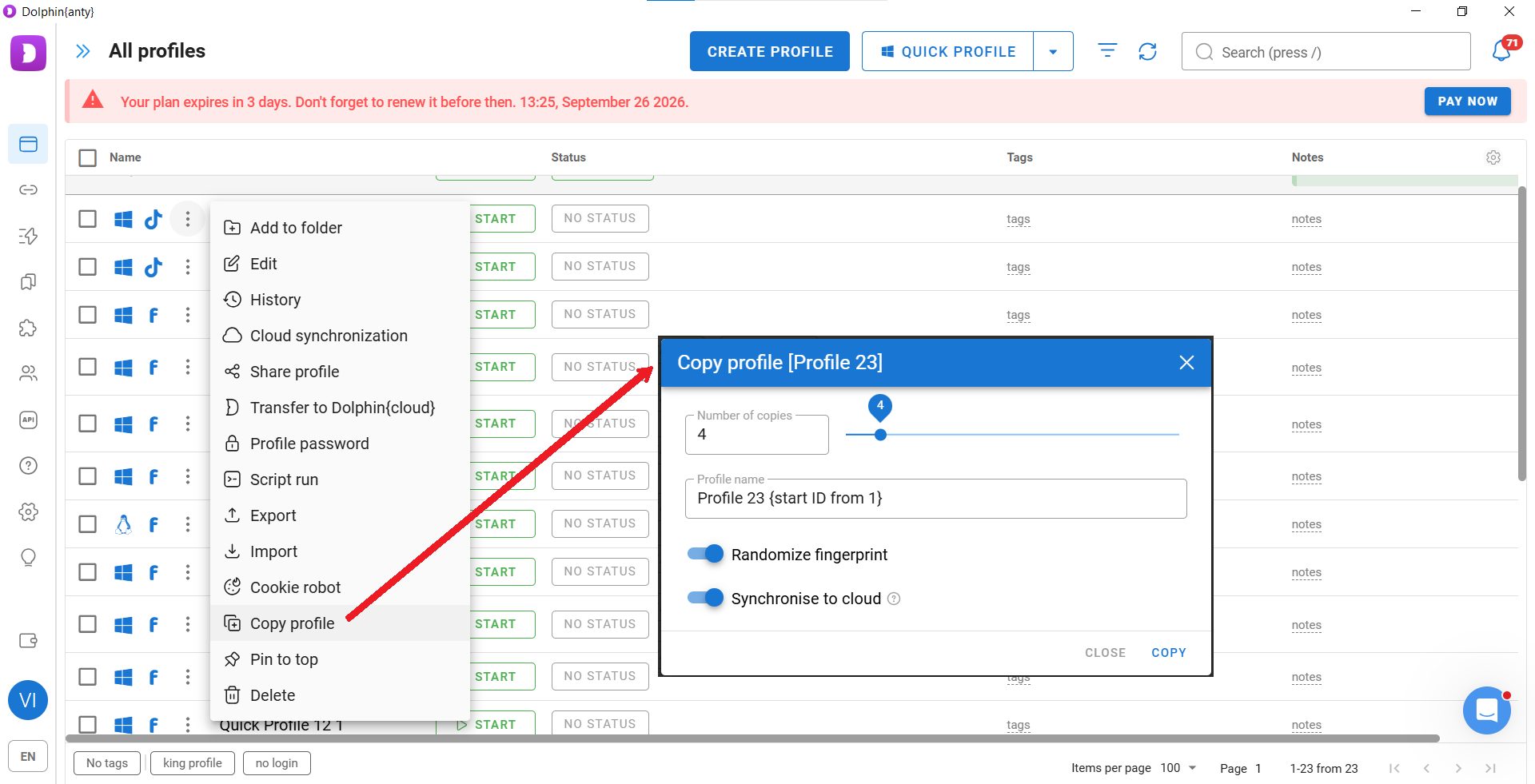
You will now have multiple copies of the profile, each with its own digital fingerprint. Using the bulk actions panel, you can then assign the corresponding number of proxy ports to all the created profiles at once. We have already shown above how to add proxies to multiple profiles.
Scenarios (scripts)
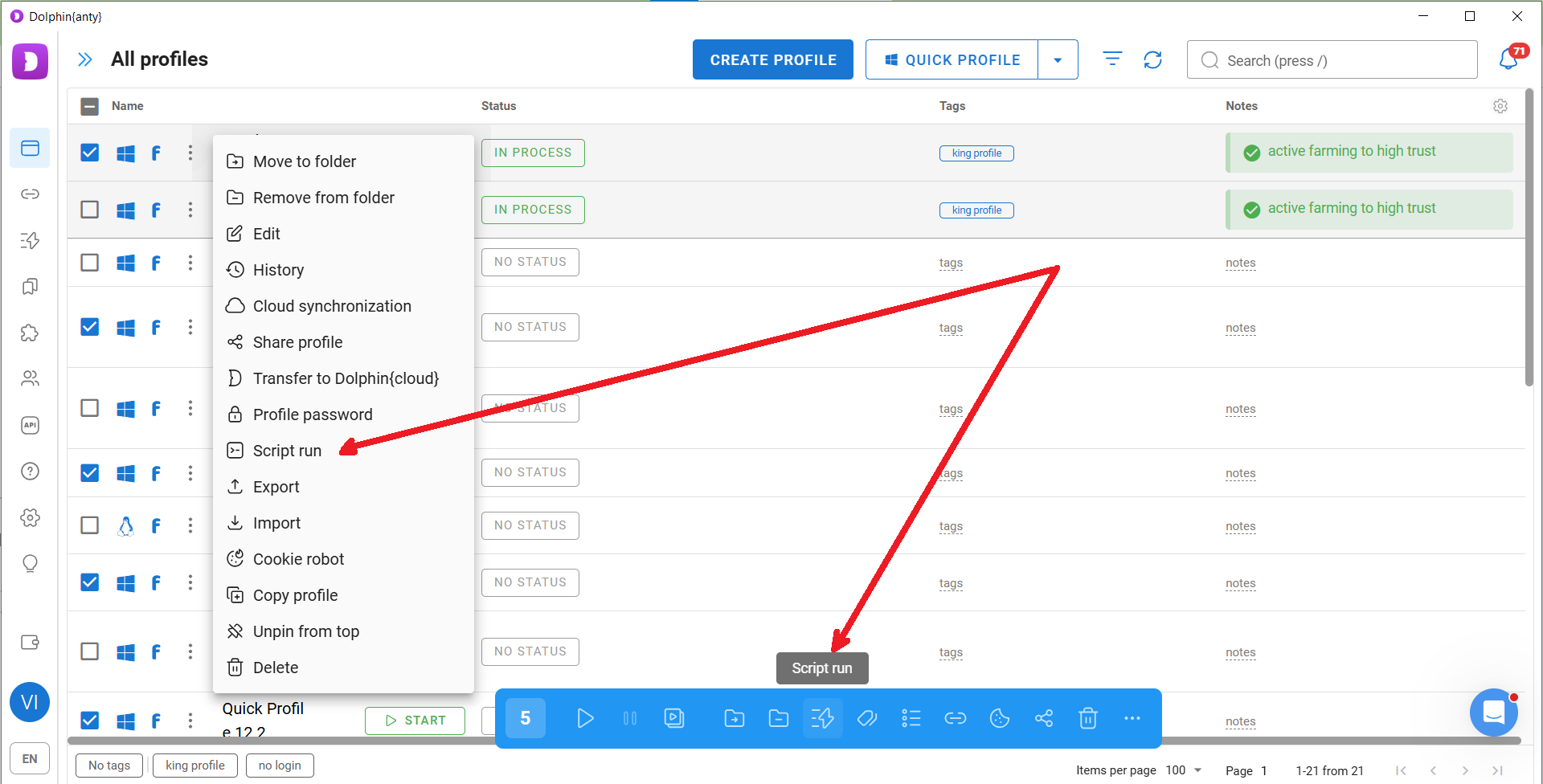
Another tool for working with a large number of profiles is scenarios. They allow you to automatically perform multiple simple actions, such as opening a URL, scrolling down a page, viewing a post, or clicking a button.
The antidetect browser can perform these actions without your involvement. Simply create a script and run it across multiple profiles at once. To create a scenario, go to the corresponding section and open the Create tab.
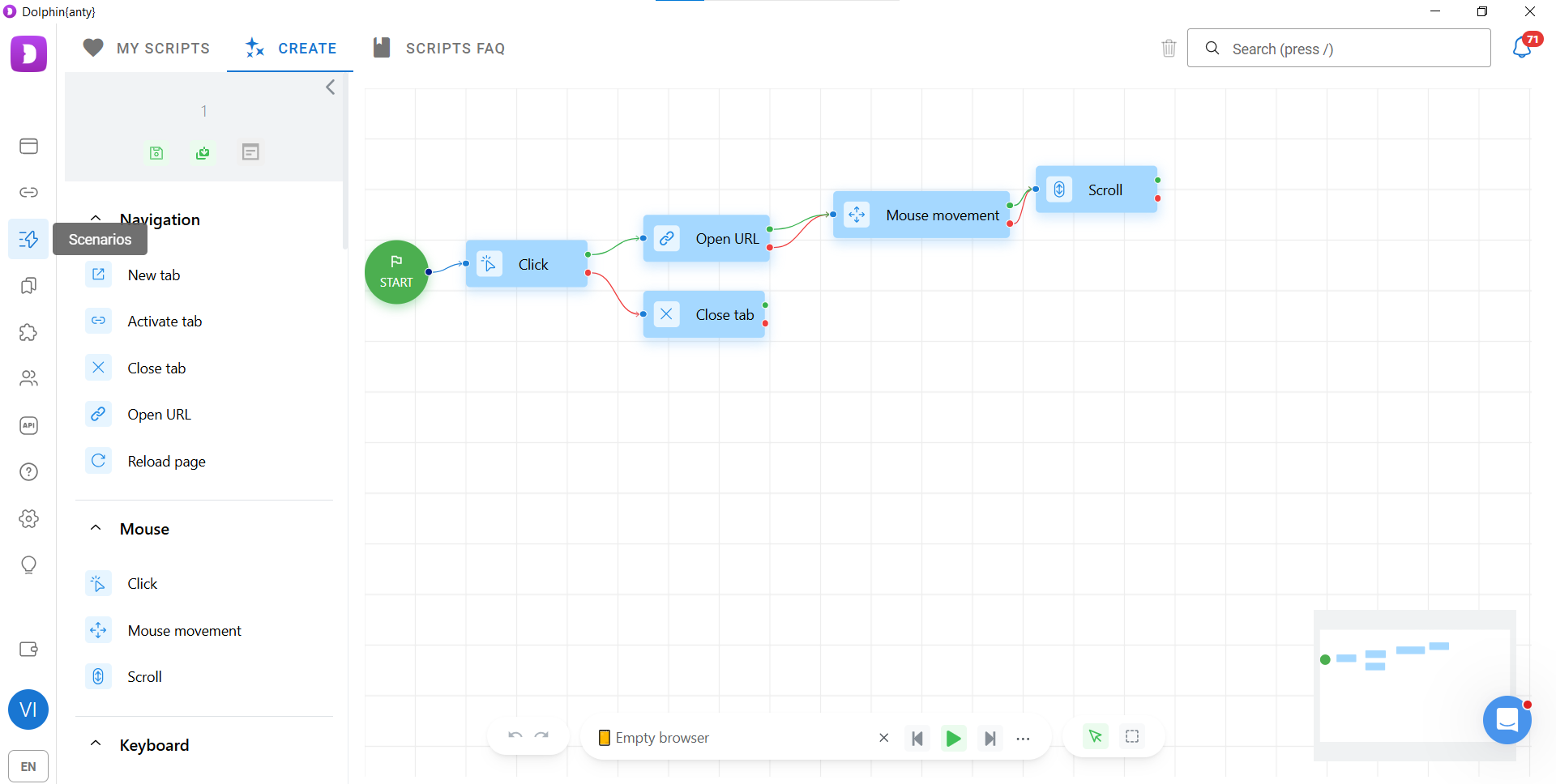
Next, save the scenario. You can then run it in a single browser profile or across multiple profiles at the same time. For example, the scenario can search for a video on YouTube, open your video → watch it to the end → like or dislike it → go to your channel.
Synchronizer
Not all actions can be automated, and some are more convenient to perform manually. However, even manual actions can be scaled by repeating them across multiple profiles at the same time. Dolphin Anty provides the Synchronizer feature for this purpose.
To launch the Synchronizer, select the profiles you need from the list and click Synchronizer on the bottom panel.
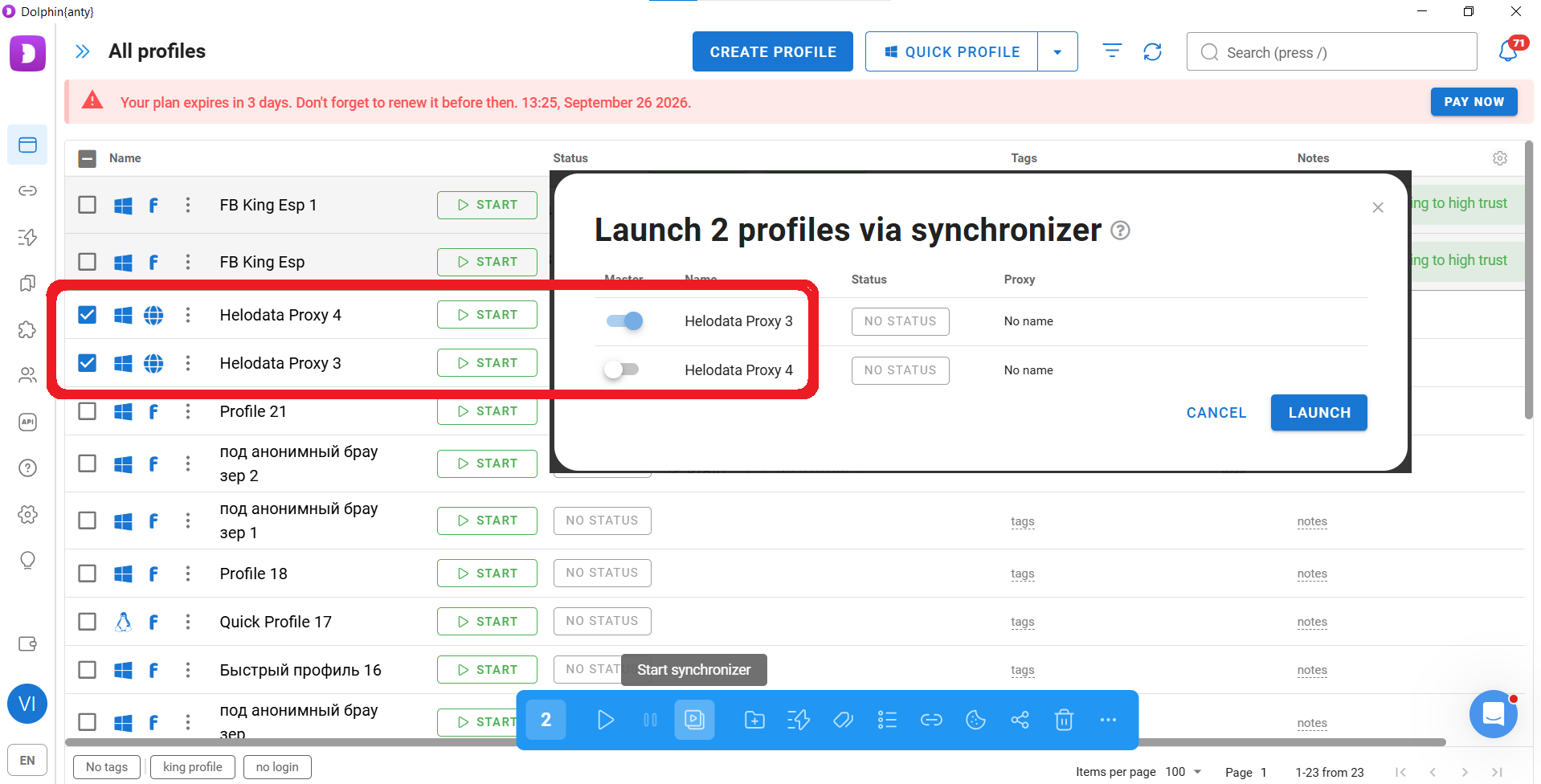
After that, select the master profile, which in this example is Helodata Proxy 3, where you will perform all actions manually, and launch the selected browser profiles. Everything you do in the master profile will be duplicated by Dolphin Anty across the other selected profiles.
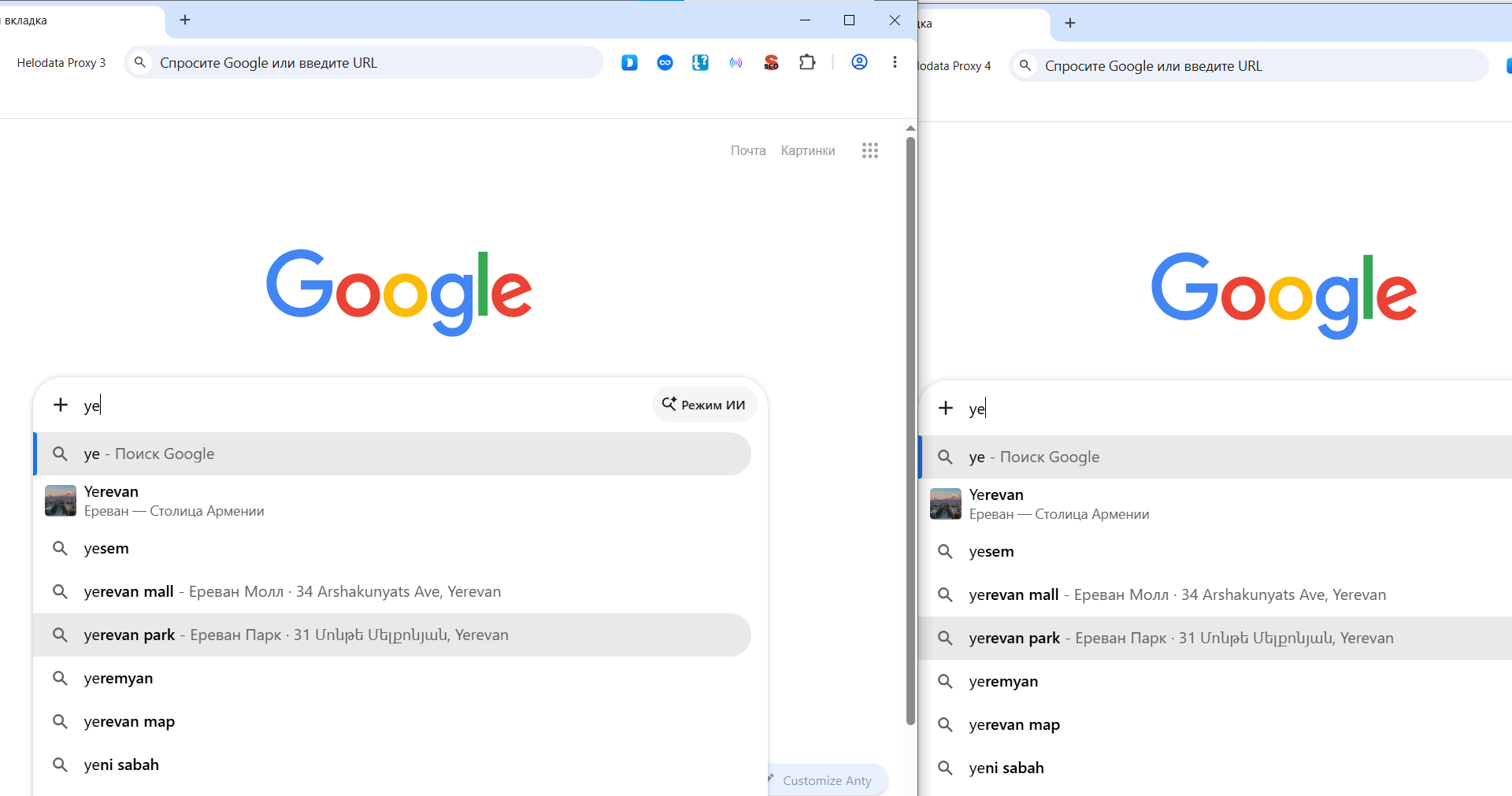
Pay attention to two things:
- First, the profile on the right duplicates everything that is done in the profile on the left;
- Second, Google shows search suggestions and results as they would appear to a user in Yerevan, Armenia, because the proxy is configured for this city.
Who is the Dolphin Anty + Helodata Proxy setup for?
In the Synchronizer example, we saw that choosing a proxy allows you to change Google suggestions and search results based on location. You can also influence them by changing digital fingerprint parameters. In this particular case, using an operating system different from your actual one may be appropriate. This is why Dolphin Anty and Helodata Proxy can be used to:
- Analyze search results for SEO purposes;
- Test how your website works across different GEOs and operating systems.
Besides SEO and website testing, Dolphin Anty + Helodata Proxy can be used for several other tasks:
- Web scraping. Helo Data proxies allow you to send requests from different IP addresses and work with the required GEOs, while Dolphin Anty creates a separate browser environment for each session. This makes it possible to collect data from websites that limit the number of requests coming from a single device;
- Marketing. The setup can be used to study recommendation feeds and advertising across different countries, regions, and devices. Another useful capability is getting past cloaking. When you view competitors’ ads through spy services, their links may be protected by cloaking, so simply following the link may not take you to the actual landing page. An antidetect browser combined with a proxy can simulate the target user that the cloaking system expects. This allows you to see not only the ad itself, but also the competitor’s actual landing page;
- E-commerce monitoring. The setup can be used to create multiple seller accounts to scale sales, as well as to monitor recommendations on marketplaces;
- Bonus hunting. Some users try to get the most out of discounts and trial periods. However, websites can identify repeat users by their IP address and fingerprint. Multiple profiles can be used to separate these sessions. Keep in mind, however, that at some point the value of the bonuses may no longer cover the cost of proxies and an antidetect browser. Widespread bonus hunting can also lead platforms to tighten their rules and reduce or remove bonuses, trials, and free plans;
- Affiliate teams. Affiliate marketing often involves working with multiple advertising accounts. Proxies and antidetect browsers help keep these accounts in separate environments when running campaigns at scale. Scenarios and Synchronizer also make it easier to scale operations across a large number of profiles.
Conclusion
An antidetect browser is a versatile tool for many types of online work. While a few years ago it could be considered a luxury, today it has become an important tool for testers, marketers, SEO and SMM specialists, affiliate marketers, and other professionals.
Most importantly, antidetect browsers continue to evolve as market requirements keep growing. Dolphin Anty keeps up with these changes by regularly updating and expanding its functionality.
To experience the full capabilities of the Dolphin Anty + Helodata Proxy setup, use promo code HELODATA20 for a discount on your first Dolphin Anty payment.