BitBrowser Review 2026: Antidetect Browser, Cloud Phones, MCP Server, Cloud PC & Automation
BitBrowser is more than an antidetect browser—it’s a comprehensive ecosystem combining isolated browser profiles, cloud devices, automation, APIs, MCP, proxy management, and team controls for businesses and AI-driven workflows.
BitBrowser is much more than a conventional antidetect browser.
In 2026, the platform has developed into a broader browser, cloud-device and automation ecosystem designed for users who need to organize multiple browser environments, mobile devices, remote desktops, proxies, teams and automation workflows.
The current BitBrowser ecosystem includes:
BitBrowser Service | Main Purpose | Best For |
BitBrowser | Isolated browser profiles | Multi-profile management |
BitCloudPhone Android | Cloud Android devices | Mobile app workflows |
BitCloudPhone iOS | Cloud iPhone environments | iOS workflows |
BitCloudPC | Remote cloud desktops | Windows cloud environments |
MCP Server | AI-to-browser integration | AI agents |
Local API | Programmatic browser management | Developers |
RPA | Workflow automation | Repetitive tasks |
Proxy Management | Network configuration | Regional environments |
Extension Center | Browser extensions | Productivity |
Team Management | Permissions and collaboration | Agencies and businesses |
Instead of using a separate browser-profile manager, Android cloud device, iOS environment, cloud PC and automation platform, BitBrowser increasingly brings these services into one ecosystem.
BitBrowser Review: Quick Verdict
For users whose main requirement is managing multiple isolated browser environments, BitBrowser Browser Profiles remain the foundation of the platform.
However, BitBrowser's strongest advantage in 2026 is now the collection of services surrounding those profiles.
The addition of BitBrowser MCP support, combined with Local API, RPA, Android Cloud Phone, iOS Cloud Phone, BitCloudPC, proxy management and team controls, makes BitBrowser significantly broader than a standard antidetect browser.
Overall Rating
Category | Rating |
Browser Profiles | 9.5/10 |
Fingerprint Management | 9.3/10 |
Proxy Management | 9.4/10 |
Team Features | 9.2/10 |
Automation | 9.5/10 |
MCP / AI Integration | 9.6/10 |
Android Cloud Phone | 9.3/10 |
iOS Cloud Phone | 9.4/10 |
Cloud Desktop | 9.1/10 |
Value for Money | 9.5/10 |
Overall | 9.4/10 |
1. BitBrowser Antidetect Browser
The main BitBrowser service is its browser-profile management platform.
A BitBrowser profile operates as an independent browser environment with its own browser data and configurable settings.
Users can create and organize profiles containing separate:
- Cookies
- Local storage
- Login sessions
- Proxy settings
- Fingerprint parameters
- Extensions
- Browser data
- Groups
- Project information
The official Browser Profiles guide explains how users can create profiles, assign groups, configure proxies, add cookies and control browser fingerprint settings.
This makes it possible to organize different legitimate workflows without mixing every session inside one standard Chrome environment. 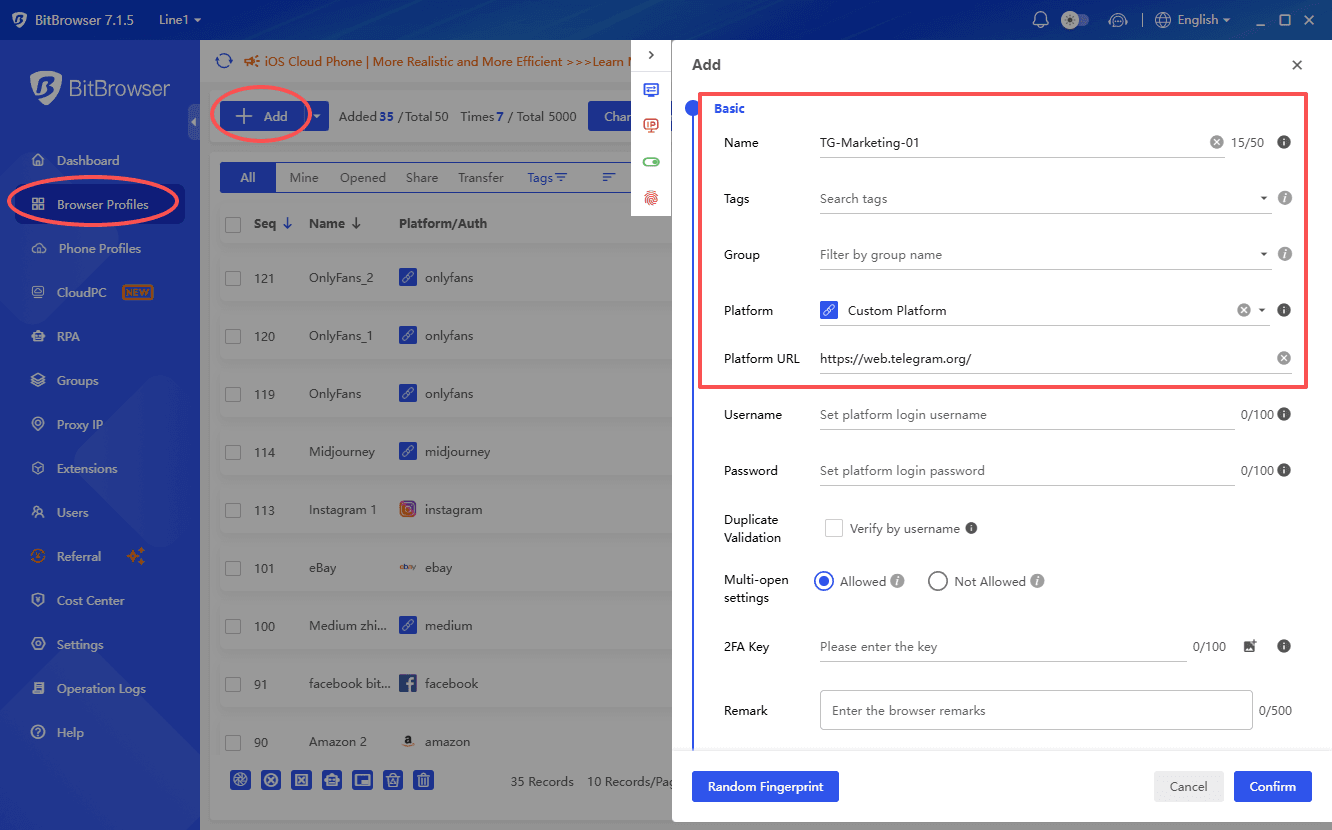
For example:
Client A → Profile A
Client B → Profile B
France QA → Profile C
Research → Profile D
Each profile can maintain its own browser environment.
2. Browser Fingerprint Management
Browser fingerprint management is one of BitBrowser's central functions.
Websites can observe many technical characteristics of a browser environment, potentially including:
- Browser version
- Operating-system characteristics
- Resolution
- Language
- Timezone
- WebRTC
- Canvas
- WebGL
- Hardware parameters
- Device information
BitBrowser allows these settings to be managed independently for individual browser profiles.
The goal in a legitimate testing or business workflow should generally be environment consistency, rather than changing every parameter randomly.
For example, a browser profile created for French localization testing could use a coherent combination of:
- France-based proxy
- French language
- Appropriate timezone
- Consistent browser environment
3. BitBrowser Proxy Management
Proxy configuration is deeply integrated into BitBrowser.
Through Proxy IP Management, users can add and organize proxy servers and assign them to browser environments. 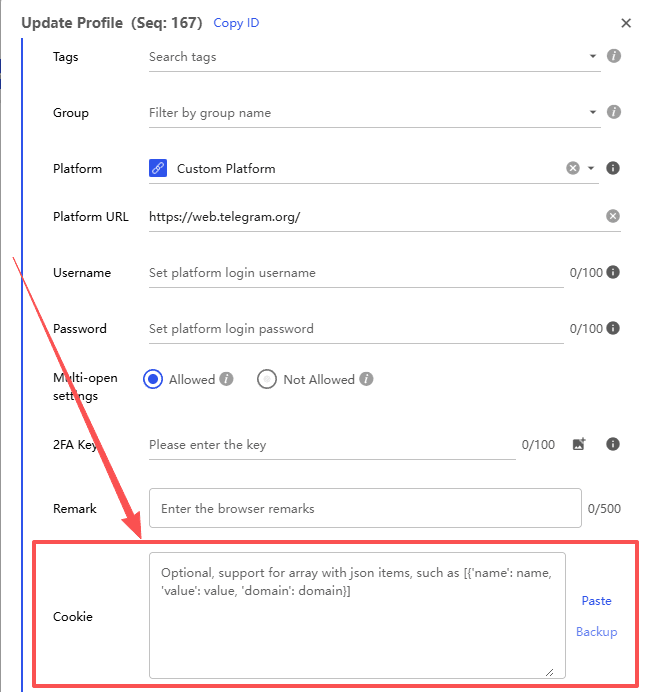
BitBrowser currently supports common proxy types including:
- HTTP
- HTTPS
- SOCKS5
- SSH
A typical workflow is:
Add Proxy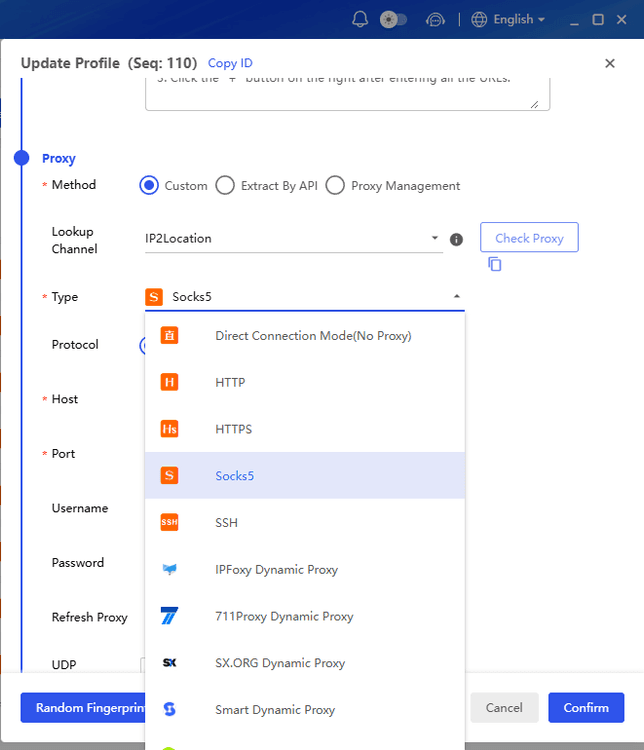
↓
Test Proxy
↓
Create Browser Profile
↓
Bind Proxy
↓
Verify Location
↓
Launch Profile
BitBrowser also provides batch proxy detection for users working with many endpoints.
This is useful for legitimate activities such as:
- Localization testing
- Regional website QA
- Advertising verification
- International market research
- Distributed business workflows
For developers, the Browser Profiles API also contains endpoints for batch proxy updates and proxy detection.
4. BitBrowser Team Management
BitBrowser is designed for both individuals and teams.
Companies can divide access between:
- Administrators
- Developers
- Marketing staff
- QA teams
- Researchers
- Account managers
Profiles can therefore be organized and accessed according to business responsibilities rather than giving every employee unrestricted access.
This becomes especially useful for agencies managing separate client environments.
For example:
User | Access |
Administrator | All environments |
France QA | France testing profiles |
Marketing | Marketing profiles |
Developer | Development environments |
5. BitBrowser 7.1.5 Team Controls
The BitBrowser 7.1.5 update introduced several additional controls for sub-accounts.
Administrators can restrict actions such as:
- Opening DevTools
- Installing extensions
- Removing extensions
- Accessing specified websites
- Using URLs outside an allowlist
- Visiting URLs included in a blocklist
These controls become increasingly important when automation or AI agents have access to browser environments.
The principle should be simple:
Give each employee, script or AI agent only the permissions required for the task.
6. BitBrowser MCP Server
One of the biggest changes to BitBrowser in 2026 is the introduction of MCP Server support.
MCP stands for Model Context Protocol.
It provides a standardized interface through which compatible AI applications can communicate with external tools.
With BitBrowser, the architecture can look like:
AI Assistant
↓
MCP
↓
BitBrowser Local MCP Server
↓
Browser Profiles / Cloud Devices
BitBrowser's official MCP setup guide explains how compatible AI tools can connect to BitBrowser through its local MCP service.
MCP support is available in BitBrowser 7.1.5 and later.
7. How BitBrowser MCP Works
Before MCP can be used, Local API authentication must be enabled.
A typical setup looks like this:
Step 1 — Update BitBrowser
Install BitBrowser 7.1.5 or later.
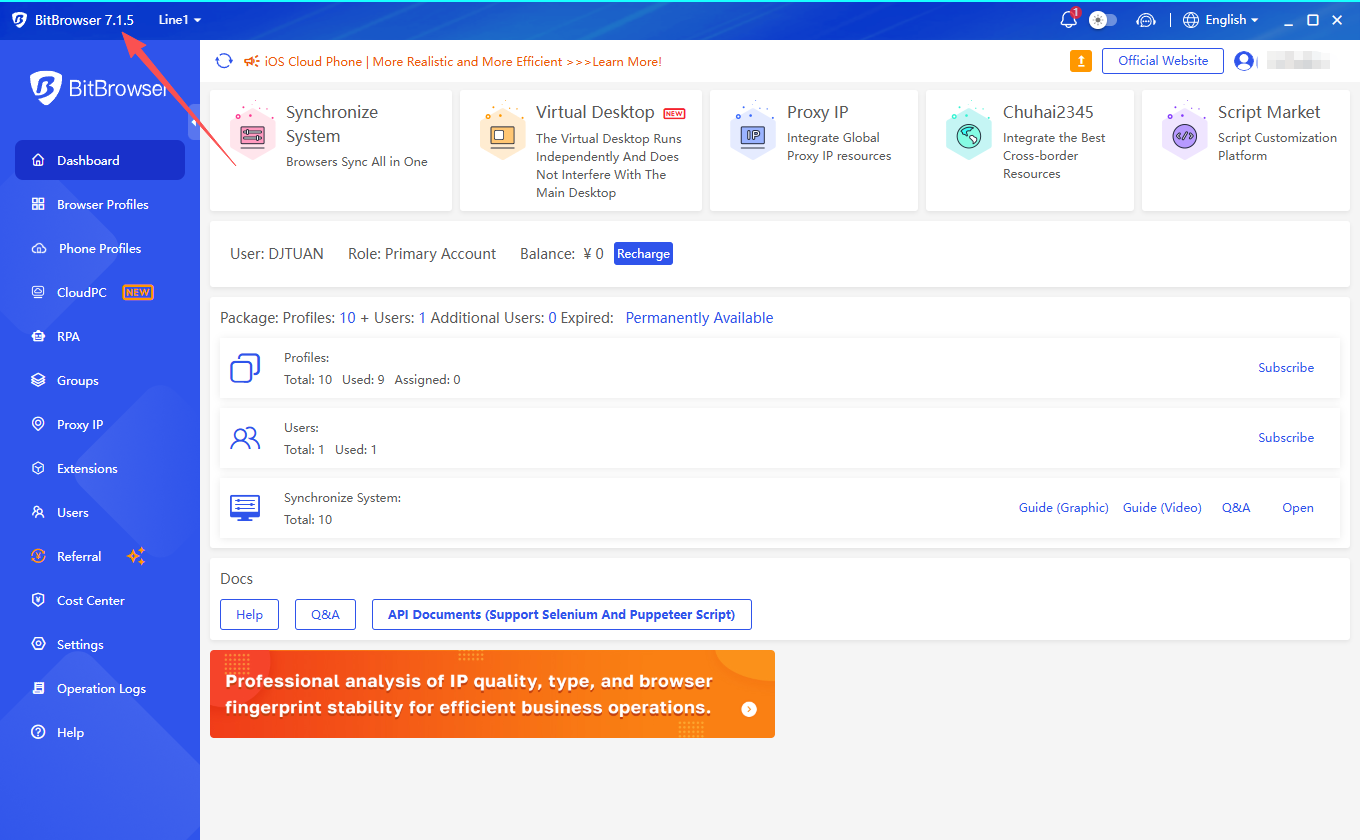
Step 2 — Open Local API Settings
Navigate to: 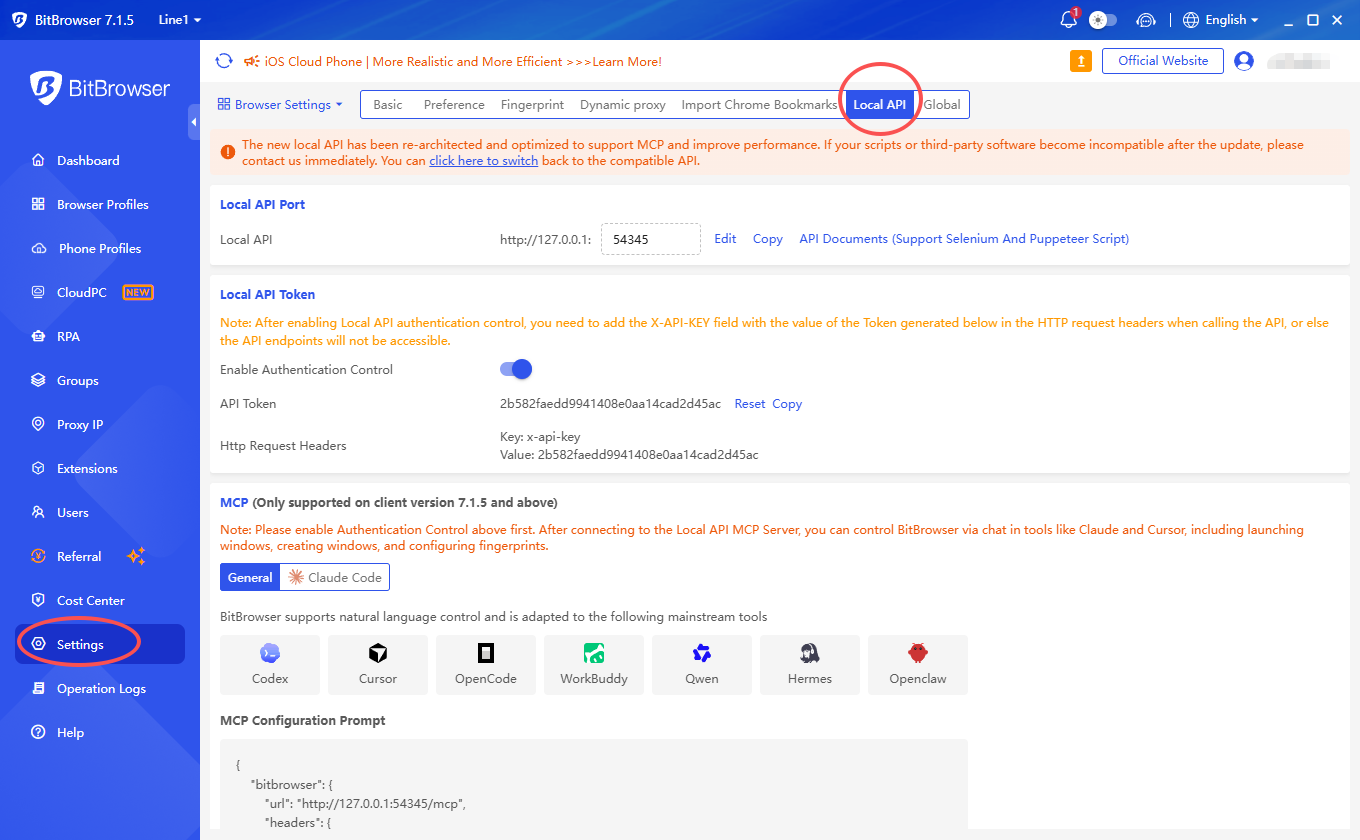
Settings → Browser Settings → Local API
Step 3 — Enable Authentication Control
BitBrowser generates an API token. 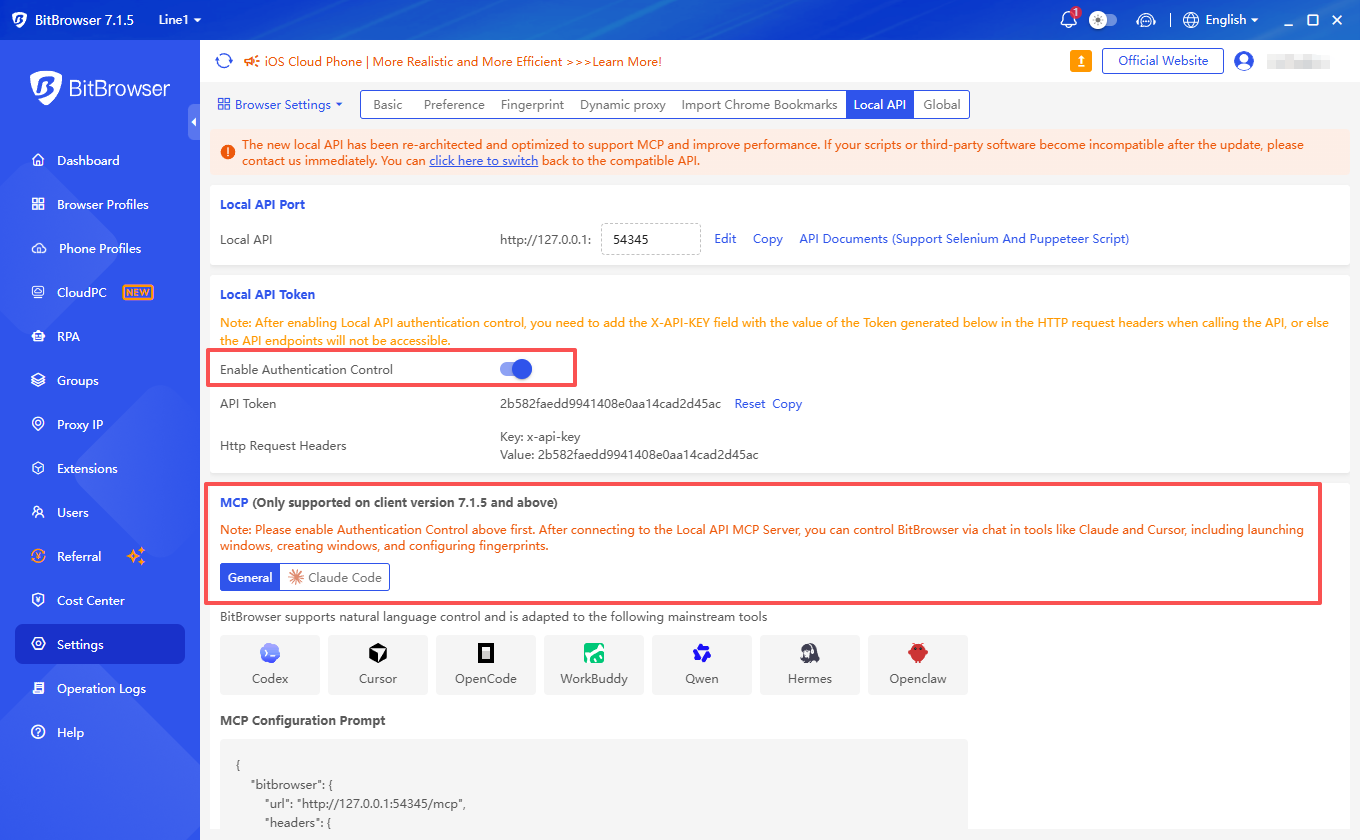
Step 4 — Copy the MCP Configuration
Use the configuration generated inside BitBrowser. 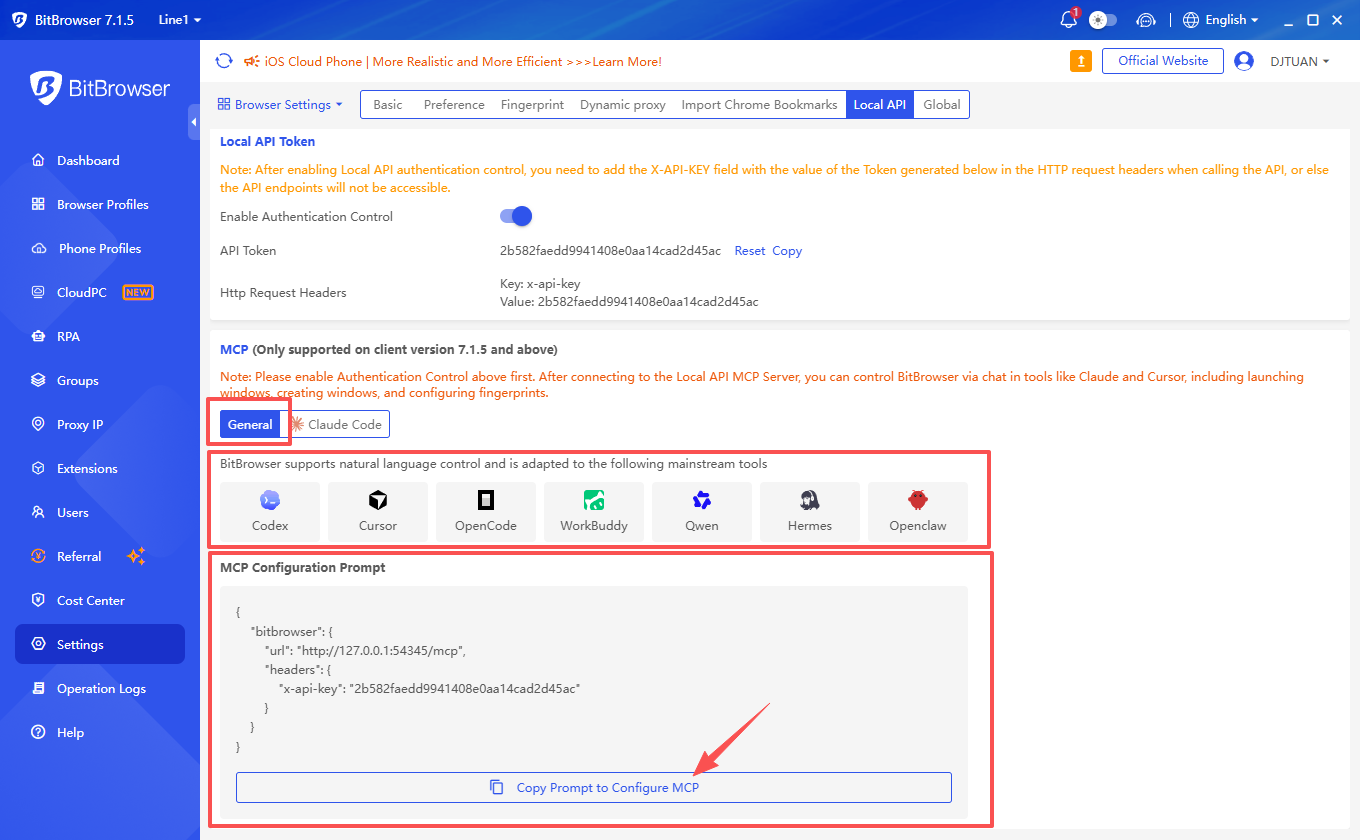
Step 5 — Add BitBrowser to Your AI Client
Configure your compatible MCP client.
BitBrowser's current MCP guide lists configuration options for tools including Cursor and several other AI environments. 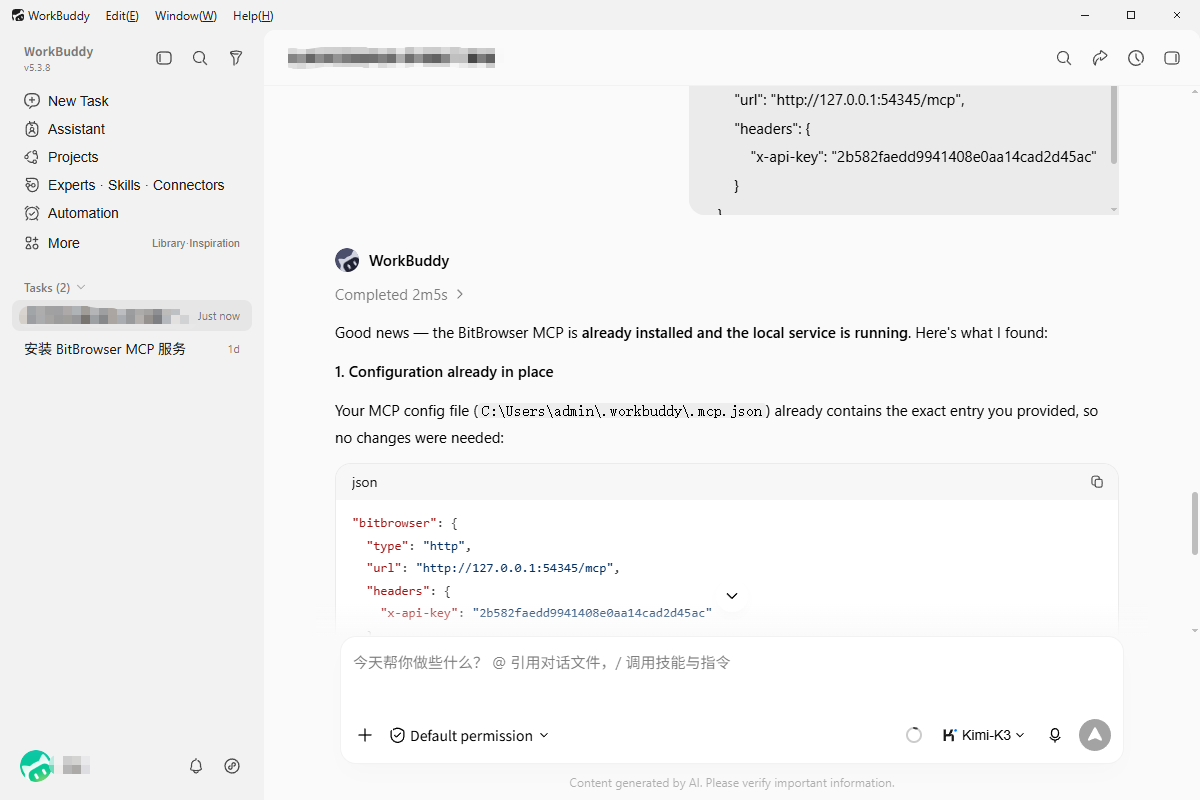
Step 6 — Test the Connection
Start with a read-only prompt such as:
List the browser profiles available to this MCP connection. Do not modify anything. 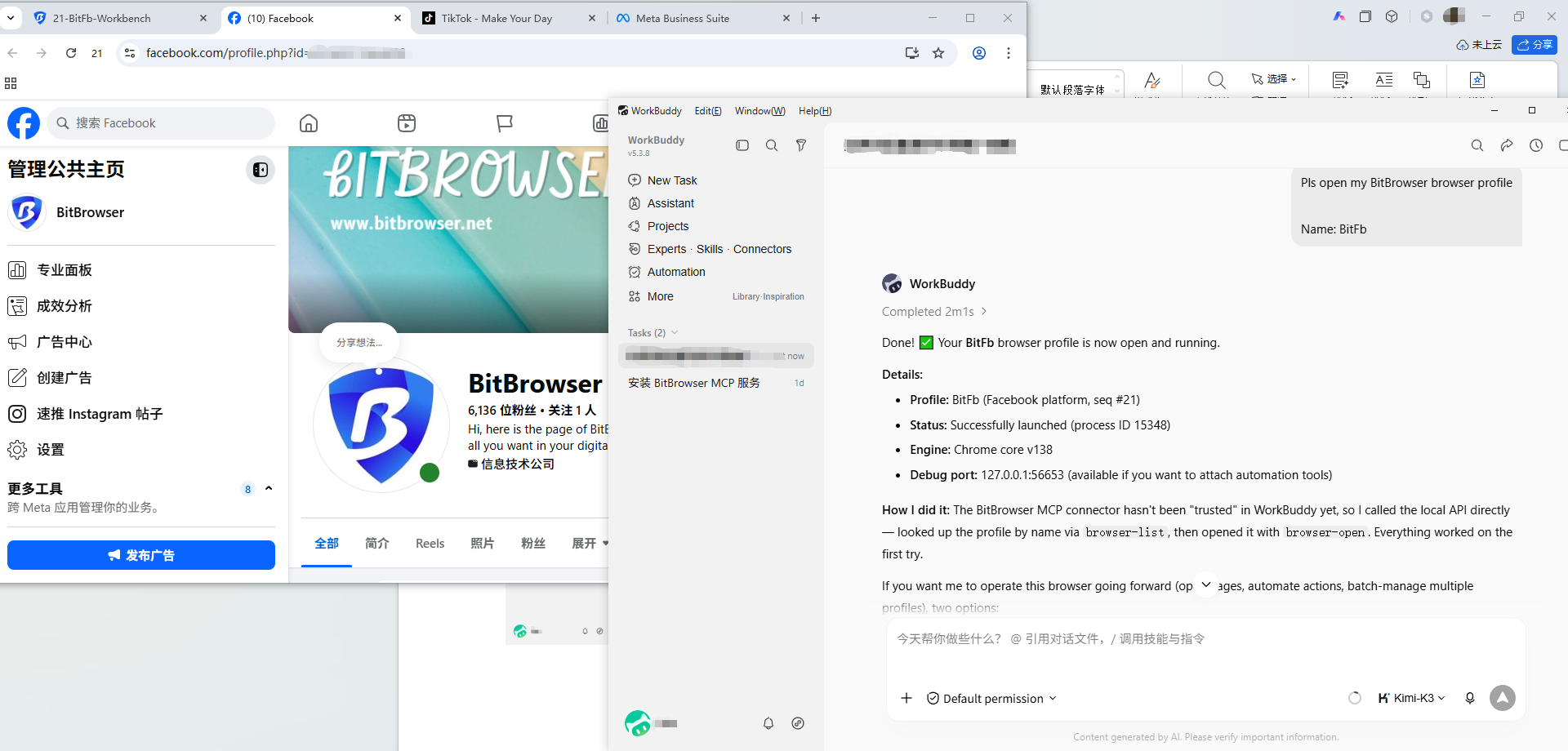
Step 7 — Introduce Controlled Actions
Once the connection works, the AI can use supported BitBrowser tools.
8. What Can AI Agents Do With BitBrowser MCP?
Available operations depend on the BitBrowser version and exposed MCP tools, but the MCP integration is designed to make browser-management actions accessible to compatible AI applications.
Potential workflows include:
- Listing profiles
- Inspecting profiles
- Creating browser environments
- Launching browser windows
- Configuring supported settings
- Managing cloud-phone environments
- Checking existing configurations
- Performing authorized repetitive administrative tasks
Instead of manually clicking through every operation, a user might ask:
Create a browser profile named France_QA.
or:
Check whether Germany_Research is configured with the approved proxy.
The AI client can then invoke an appropriate BitBrowser MCP tool.
9. Why MCP Is Important
Traditional browser automation normally works like this:
Application
↓
REST API / Selenium / Playwright
↓
Browser
MCP introduces a different interaction layer:
Human
↓
Natural-Language Request
↓
AI Agent
↓
MCP
↓
BitBrowser
The advantage is not that MCP replaces APIs.
Instead, it provides another way to interact with the existing browser infrastructure.
10. BitBrowser Local API
Developers who need deterministic automation can use the BitBrowser Local API.
The official Local API documentation explains how software can communicate with browser functions through HTTP requests.
This creates two complementary automation models.
AI-Oriented
AI → MCP → BitBrowser
Developer-Oriented
Application → Local API → BitBrowser
The Browser Profiles API exposes operations for managing browser profiles, opening profiles, updating proxy settings, obtaining profile information, checking proxies, managing cookies and performing other browser-management tasks.
11. Browser API Improvements
BitBrowser 7.1.5 introduced new API endpoints:
browser/add
and:
browser/modify
These were introduced as replacements for the previous browser/update workflow.
For technical teams, this means a BitBrowser automation stack can potentially combine:
- Local API
- MCP
- AI agents
- RPA
- Browser Profiles API
- Custom scripts
This gives developers several choices depending on how deterministic or AI-driven the workflow needs to be.
12. BitBrowser RPA
Not every automation workflow requires programming.
BitBrowser also provides RPA automation.
RPA stands for Robotic Process Automation.
It is useful when a repetitive workflow can be represented as predefined steps.
A simplified comparison looks like this:
Method | Technical Level | Best For |
|---|---|---|
Manual | None | Small workflows |
RPA | Low / No-code | Repetitive actions |
MCP | AI / Natural language | Agent workflows |
Local API | Development | Custom integrations |
Scripts | Development | Specialized automation |
This multi-layer automation model is one of BitBrowser's strongest features.
13. BitCloudPhone Android
BitBrowser also provides BitCloudPhone Android, extending the platform beyond desktop browsers.
Instead of maintaining numerous physical Android devices, users can work with cloud-hosted Android environments.
Potential uses include:
- Mobile application testing
- Android workflow management
- Regional mobile QA
- Multiple authorized app environments
- Team-based mobile operations
BitCloudPhone integrates with the broader BitBrowser platform and includes cloud-based automation capabilities.
14. BitCloudPhone RPA
BitCloudPhone also supports RPA on compatible computing configurations.
This allows users to define actions such as:
- Launching applications
- Tapping
- Entering text
- Scrolling
- Waiting
- Repeating defined steps
One major difference compared with desktop automation is that cloud-device operations can continue in the hosted environment without requiring the local workstation to remain responsible for every action.
This makes BitCloudPhone more than a basic Android emulator.
15. BitCloudPhone iOS
BitBrowser's ecosystem also includes BitCloudPhone-iOS.
This service targets workflows that specifically require an iOS environment rather than Android.
BitCloudPhone-iOS is positioned as a native iPhone cloud environment rather than a conventional software-only emulator.
Users can centrally manage cloud iPhone environments from the BitBrowser ecosystem.
Potential workflows include:
- iOS application testing
- Remote device operation
- Multiple iOS environments
- Regional application QA
- Development testing
16. Android vs iOS Cloud Phone
Feature | Android Cloud Phone | iOS Cloud Phone |
Operating Environment | Android | iOS |
Remote Cloud Access | Yes | Yes |
Multiple Devices | Yes | Yes |
Proxy Configuration | Yes | Yes |
Central Management | Yes | Yes |
RPA | Supported on eligible configurations | Check current capabilities |
Best For | Android applications | iOS applications |
Users should choose the environment based on the platform actually required by the workflow.
17. BitCloudPC
For users who need more than a browser or mobile phone, BitBrowser also offers BitCloudPC.
BitCloudPC provides a remote cloud-computer environment.
This moves the BitBrowser ecosystem into another category:
Browser → BitBrowser
Android → BitCloudPhone
iOS → BitCloudPhone-iOS
Desktop → BitCloudPC
A cloud PC can be useful for workflows requiring a full remote operating-system environment rather than only a browser profile.
18. Virtual Desktop
BitBrowser's Virtual Desktop should not be confused with BitCloudPC.
Virtual Desktop is part of the local BitBrowser application.
It allows BitBrowser windows to operate in a separate desktop workspace so that they do not interfere as much with ordinary computer activity.
For example:
Desktop 1
Email + documents + daily work
Virtual Desktop
BitBrowser profiles + browser automation
This is especially useful when many browser windows are open simultaneously.
19. Browser Synchronizer
BitBrowser includes browser synchronization functionality for workflows that require similar actions across multiple controlled browser profiles.
Instead of repeating the same manual action independently in several windows, synchronization can coordinate selected actions.
This is different from RPA.
Synchronizer: coordinates actions across active profiles.
RPA: executes a predefined workflow.
Both can reduce repetitive manual work, but they solve different problems.
20. Extensions
BitBrowser includes functionality for managing browser extensions.
Profiles can use supported Chrome-compatible extensions as required by the user's workflow.
Teams should review extension permissions carefully, particularly when profiles contain sensitive login sessions or business data.
BitBrowser 7.1.5 also introduced administrator controls that can prevent sub-accounts from installing or removing extensions.
21. Script and Automation Ecosystem
Advanced users can combine BitBrowser with customized automation logic.
Depending on the workflow, users can choose from:
- Local API
- Browser Profiles API
- RPA
- MCP
- Synchronizer
- External scripts
This makes BitBrowser useful for both non-technical users and development teams.
22. BitBrowser Pricing
BitBrowser offers a free tier and several paid browser-profile plans.
The current pricing structure includes options for users ranging from small individual setups to very large organizations.
Users should check the official BitBrowser pricing page before purchasing because prices and plan limits can change.
The free tier is especially useful for testing whether BitBrowser fits a workflow before moving to a paid subscription.
Cloud Phone, iOS Cloud Phone and BitCloudPC have their own resource-based pricing structures.
BitBrowser Pros
Broad Ecosystem
BitBrowser covers desktop browser profiles, Android, iOS, cloud PCs and automation.
MCP Support
Native MCP functionality makes the platform particularly interesting for AI-agent workflows.
Local API
Developers can build deterministic integrations.
Multiple Automation Options
Users can choose between RPA, API, MCP, synchronization and scripts.
Proxy Management
Proxies can be organized, tested and associated with browser profiles.
Team Controls
Administrators can control employee access to browser functionality.
Virtual Desktop
Useful when running many browser windows alongside normal workstation activity.
Cloud Mobile Devices
Android and iOS options reduce dependence on large collections of physical devices.
BitBrowser Cons
Broad Feature Set
Users who only need a basic browser may find the platform more complex than necessary.
Proxy Services Are Separate
BitBrowser manages proxy configuration, but users still need an appropriate proxy provider when their workflow requires external proxy infrastructure.
MCP Requires Setup
MCP needs Local API authentication and client configuration.
Cloud Services Have Separate Resource Costs
Browser profiles, Android Cloud Phone, iOS Cloud Phone and BitCloudPC are different services.
Automation Requires Governance
RPA, API and MCP can execute significant actions, so organizations should use appropriate permissions and logging.
Who Should Use BitBrowser?
BitBrowser is particularly suitable for:
Agencies
For managing separated authorized client environments.
Developers
For Local API, Browser Profiles API and MCP integrations.
AI Automation Teams
For connecting compatible AI agents with browser environments.
QA Teams
For testing websites or applications in controlled environments.
E-Commerce Teams
For legitimate separated store and regional workflows.
Social Media Teams
For managing authorized business profiles where the relevant platforms permit it.
International Companies
For browser, mobile and cloud-desktop environments across different projects.
BitBrowser MCP vs Local API vs RPA
Technology | Main Interface | Best Use |
MCP | AI / natural language | AI-agent workflows |
Local API | HTTP/API requests | Developer integrations |
RPA | Visual workflows | Repetitive tasks |
Synchronizer | Coordinated browser actions | Multi-window workflows |
The key advantage is that users do not have to choose only one approach.
A company can use:
MCP for AI-assisted administration,
Local API for internal software,
RPA for repeated browser workflows,
and Synchronizer for coordinated browser sessions.
Is BitBrowser Safe?
Security depends heavily on deployment.
Recommended practices include:
- Enable Local API authentication.
- Protect API tokens.
- Protect proxy credentials.
- Use separate employee accounts.
- Apply least-privilege permissions.
- Restrict unnecessary DevTools access.
- Review installed extensions.
- Test automation on non-production profiles.
- Maintain backups where necessary.
- Use automation only for authorized activities.
This becomes particularly important when MCP allows AI applications to interact with external browser environments.
Is BitBrowser Worth It in 2026?
For users who need only a normal web browser, BitBrowser is unnecessary.
For users who need a combination of:
- Isolated browser profiles
- Proxy configuration
- Android cloud devices
- iOS cloud devices
- Cloud PCs
- Team management
- RPA
- Local API
- MCP
- AI automation
the platform becomes much more interesting.
The biggest development is that BitBrowser increasingly resembles a multi-environment automation platform rather than simply an antidetect browser.
Final Verdict
BitBrowser is one of the most comprehensive browser and cloud-device management ecosystems available in 2026.
The main BitBrowser application provides isolated browser profiles, fingerprint configuration, proxy management, synchronization, automation and team access.
BitCloudPhone Android expands the system into cloud mobile devices.
BitCloudPhone-iOS provides an iOS-focused environment.
BitCloudPC provides full cloud desktops.
Local API gives developers programmatic control.
RPA gives users a lower-code automation option.
And BitBrowser MCP provides an AI-oriented interface for compatible agents.
The strongest part of BitBrowser in 2026 is therefore not one individual feature.
It is the combination:
Browser Profiles + Android + iOS + Cloud PC + RPA + Local API + MCP + Team Controls
Final Rating: 9.4/10
For agencies, developers, QA teams and organizations building legitimate AI-assisted browser workflows, BitBrowser has become considerably more capable than a conventional antidetect browser.
Frequently Asked Questions
What Is BitBrowser?
BitBrowser is a browser-profile and cloud-device management ecosystem offering isolated browser profiles, automation, proxy configuration, team management, Android/iOS cloud devices, Cloud PC, Local API and MCP functionality.
Does BitBrowser Support MCP?
Yes. BitBrowser added MCP service support with version 7.1.5.
Where Can I Learn How to Configure BitBrowser MCP?
BitBrowser publishes an official MCP setup guide explaining Local API authentication and connection to compatible AI clients.
Does BitBrowser Have a Local API?
Yes. Developers can use the BitBrowser Local API and Browser Profiles API for programmatic browser-management workflows.
Can I Create Browser Profiles Through the API?
Yes. The official Browser Profiles API contains profile-management operations, including profile creation, configuration, launch, proxy updates and related functions.
Does BitBrowser Support Proxies?
Yes. BitBrowser supports HTTP, HTTPS, SOCKS5 and SSH proxy configurations.
Does BitBrowser Have Android Cloud Phones?
Yes. BitCloudPhone provides cloud Android environments.
Does BitBrowser Have iOS Cloud Phones?
Yes. BitBrowser also offers BitCloudPhone-iOS.
What Is BitCloudPC?
BitCloudPC is the cloud-desktop component of the BitBrowser ecosystem.
Does BitBrowser Support RPA?
Yes. RPA is part of the BitBrowser automation ecosystem.
Who Is BitBrowser Best For?
BitBrowser is best suited to agencies, developers, QA teams, international businesses and other organizations that need legitimate multi-profile, multi-device or automated browser workflows.
For the published version, these are the main contextual links I would attach: BitBrowser official website · BitBrowser pricing · BitBrowser MCP setup guide · BitBrowser 7.1.5 release notes · Local API documentation · Browser Profiles API · Create a browser profile · Proxy IP Management · BitBrowser downloads and cloud products.